Count stock
What you'll accomplish
What KJB believes you hold is checked against what is physically on the shelf, and the difference is recorded rather than absorbed.
When to do it
At a regular interval, and before anything that depends on the figures being right. A count is also the honest answer when stock numbers have stopped feeling believable.
How a count works
A count is a session, not a single action. You open one for a date, count the lines, and submit it. That structure exists because counting takes time and rarely happens in one sitting.
A count can be full or partial. A full count covers everything; a partial covers a department or a section — useful when you want the walk-in checked weekly and the dry store monthly.
Steps
-
Open Manage ▸ Stock Lifecycle ▸ Stock Count. Sessions you have already opened are listed at the top, under Sessions; the form to start a new one is below it.
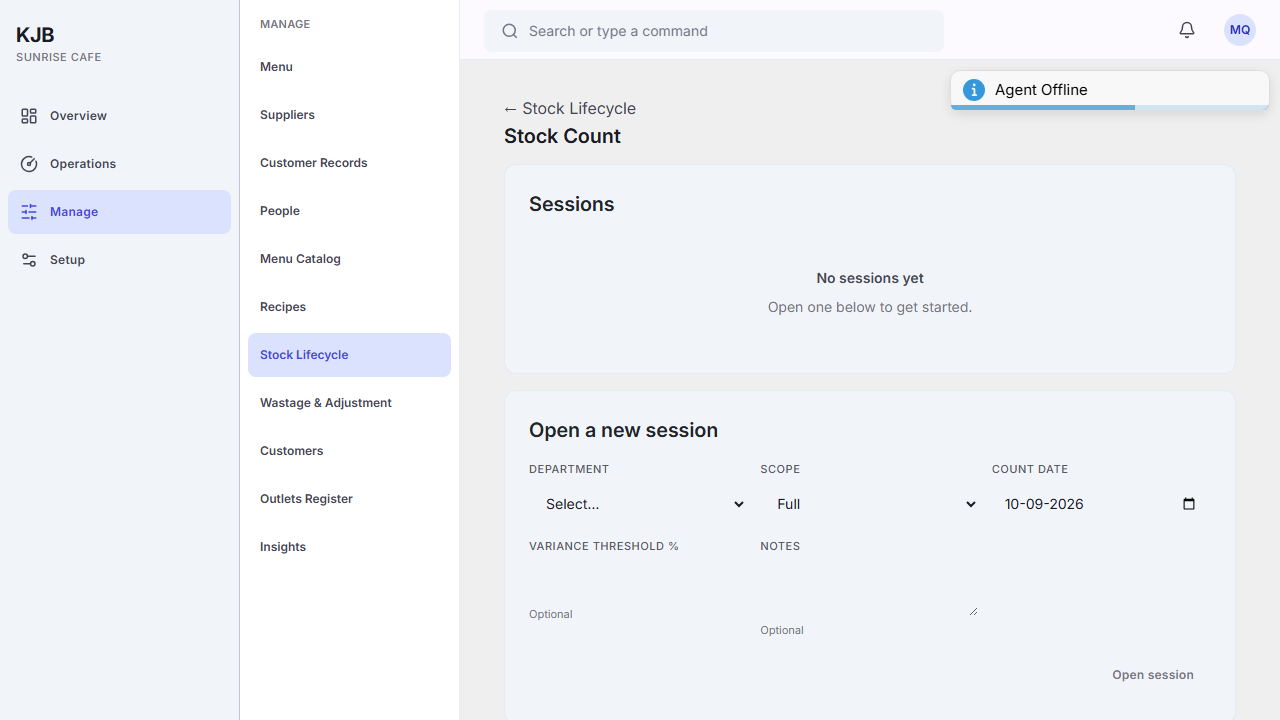 2. Under Open a new session, set the Count date and choose a Department.
3. Set the Scope. Full covers everything; scoping it to a department covers only that.
4. Optionally set a Variance threshold % and Notes. The threshold is what you are
willing to treat as ordinary measurement noise — differences beyond it are the ones worth investigating.
Leaving it empty is a decision to look at every difference yourself.
5. Select Open session.
6. Count what is physically there and enter it, line by line.
7. Submit when every line has been counted — the session will not submit part-done.
2. Under Open a new session, set the Count date and choose a Department.
3. Set the Scope. Full covers everything; scoping it to a department covers only that.
4. Optionally set a Variance threshold % and Notes. The threshold is what you are
willing to treat as ordinary measurement noise — differences beyond it are the ones worth investigating.
Leaving it empty is a decision to look at every difference yourself.
5. Select Open session.
6. Count what is physically there and enter it, line by line.
7. Submit when every line has been counted — the session will not submit part-done.
Expected result: the session is recorded, and differences between counted and expected are visible.
The rule that makes a count worth doing
Count first, look second. If you read the expected figure before counting, you will find the expected figure — not deliberately, but reliably. The difference is the entire value of the exercise, and it only survives if the count is independent of the expectation.
Things to know
Every line has to be counted before the session can be submitted. A partial count is a partial answer, and the screen holds you to finishing what you started.
A session can be cancelled if it was opened in error or has gone stale.
A difference is information, not an accusation. Spillage, unrecorded wastage, a mis-keyed delivery and theft all look identical in the number. What makes them distinguishable is recording wastage as it happens — see How stock works in KJB.