Bank accounts
A bank account in Books is a ledger in Chart of Accounts under the group Bank Accounts or Bank OD A/c. Add it once, with the bank's details and the date you start reconciling, and it is ready to use everywhere money moves through the bank. For each bank account you set:
- the account holder, the account number, the IFSC and the bank and branch,
- the opening balance, Dr or Cr,
- the date from which you reconcile,
- its cheque books and the cheque printing format.
Open it from Books ▸ Accounts ▸ Chart of Accounts ▸ + Ledger.
Why it matters for filing
Income tax (ITR). Your bank balance is on your Balance Sheet. It starts from the opening balance you enter here. If the opening balance is wrong, every later balance is wrong, and so is the figure in your return. Take it from your bank statement or passbook on the day you start in Books.
GST. Banks charge GST on their charges. To claim it at an outlet that takes input tax credit you need the bank's GSTIN, which you enter when you record the charge in Bank Reconciliation. A bank account here carries no GST of its own.
Cash limits. Money you pay and receive through a bank account is outside the cash limits of the Income-tax Act 2025: ₹10,000 a day to one person for a payment, ₹2,00,000 for a receipt, and ₹20,000 for a loan or deposit. See Receipts and Payments.
What the bank account setup shows
Select + Ledger. The panel New ledger opens on the right.
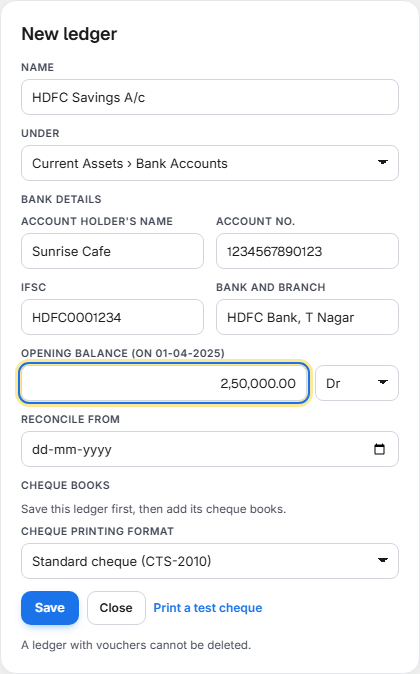
| Field | What to enter |
|---|---|
| Name | How you will recognise it, for example HDFC Current A/c. |
| Under | Current Assets › Bank Accounts for a current or savings account, or Loans (Liability) › Bank OD A/c for an overdraft or cash credit account. The bank details appear when you choose either. |
Bank details
| Field | What to enter |
|---|---|
| Account holder's name | The name on the account. |
| Account no. | 4 to 34 letters or digits: Account no. is 4 to 34 letters or digits. Where your login is not allowed to see the whole number, only the last four digits are shown. |
| IFSC | 4 letters, a zero, then 6 letters or digits, for example HDFC0001234. It is changed to capitals as you type. |
| Bank and branch | For example HDFC Bank, T Nagar. |
Opening balance and Reconcile from
| Field | What it means |
|---|---|
| Opening balance (on 01-04-2026) | The balance on the date shown, taken from your statement. Choose Dr for money you have in the bank, or Cr if the account is overdrawn. |
| Reconcile from | The date you start reconciling this account in Bank Reconciliation. Cheques you gave and deposits you made before it that the bank had not cleared are entered there as opening items. |
Once a year has been closed, the opening balance can no longer be changed: Opening balances are no longer editable. See Year Close.
Cheque books and the printing format
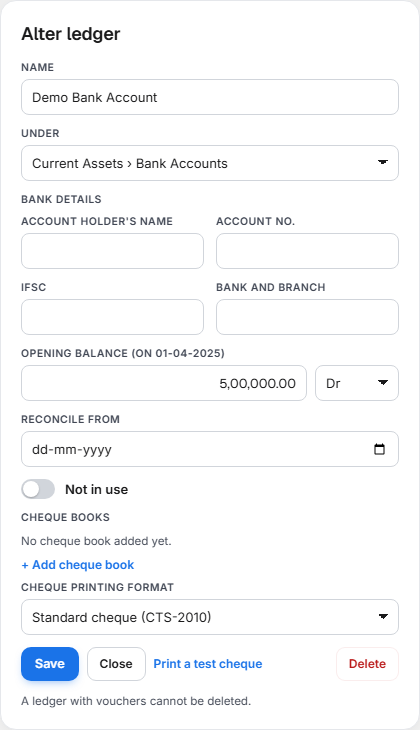
A new ledger first says Save this ledger first, then add its cheque books. Select Save, then open the bank account again.
| Control | What it does |
|---|---|
| The cheque book table | From no., To no. and Used, for example 3 of 25: leaves used or spoiled, out of all leaves. |
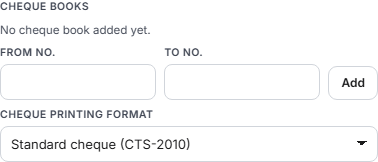
| + Add cheque book | Opens From no. and To no.. Enter the first and last number, for example 000101 and 000125, and select Add. |
| Remove | Takes out a cheque book that has no used or spoiled leaf. |
| Cheque printing format | Standard cheque (CTS-2010). |
| Print a test cheque | Prints a sample cheque with made-up details on plain paper, so you can check it against a real cheque. |
| Message | What it means |
|---|---|
| Enter the first and last cheque number, digits only (for example 004501 and 004550). | A number has a letter or is missing. |
| The last cheque number cannot be less than the first. | The two numbers are the wrong way round. |
When you pay by cheque from this account, Books suggests the next unused number from the cheque book. See Receipts and Payments and Cheques.
Select Save to keep the ledger, Close to leave it. Delete is for a ledger you added by mistake; A ledger with vouchers cannot be deleted. A bank account you no longer use can be marked Not in use instead.
Where a bank account appears once it is added
| Where | What for |
|---|---|
| Books ▸ Banking | The cash and bank choice of Receipts and Payments, the bank account of Bank Reconciliation and the bank of Cheques. |
| Purchases ▸ Payments | The bank you pay a supplier from. See Purchases. |
| Expenses | Paid from, when you pay an expense from the bank. See Expenses. |
| The counter | The bank that UPI money is received in. |
What to do
- Open Chart of Accounts and select + Ledger.
- Enter the Name, and choose Bank Accounts or Bank OD A/c under Under.
- Enter the Account holder's name, Account no., IFSC and Bank and branch.
- Enter the Opening balance from your statement and choose Dr or Cr.
- Choose Reconcile from, usually the date you start in Books.
- Select Save.
- Open the bank account again and select + Add cheque book. Enter the first and last cheque number and select Add.
- Select Print a test cheque and check the lines against a real cheque.
What to do when something needs attention
| You see | What it means | What to do |
|---|---|---|
| No bank details when you choose a group | The group is not under Bank Accounts or Bank OD A/c. | Choose Bank Accounts or Bank OD A/c. |
| IFSC is 4 letters, a zero, then 6 letters or digits (for example HDFC0001234). | The IFSC is mistyped. | Copy it from your cheque book or statement. |
| The bank is not in a list in Banking | It was not added under a bank group. | Check its group under Under. |
| No is the next unused cheque note on a payment by cheque | The account has no cheque book, or all leaves are used. | Add a cheque book here. |
| Delete is refused | The account has vouchers. | Leave it, or mark it Not in use. |
| The opening balance cannot be edited | A year has been closed. | See Year Close. |
Related
- Chart of Accounts: the groups, ledgers and opening balances.
- Day Book, Ledger and Journals: the bank ledger's balance after every entry.
- Receipts and Payments, Bank Reconciliation and Cheques: the Banking tabs.