Cheques
Cheques is the register of every cheque you gave or received, and whether the bank has cleared it. It shows:
- the cheques of one bank account, for the period you choose,
- how many are not yet cleared, how many are post-dated, and how many leaves of the cheque book are unused,
- a button to print a cheque, and a way to mark a torn or wrongly written cheque as spoiled.
Open it from Books ▸ Banking ▸ Cheques.
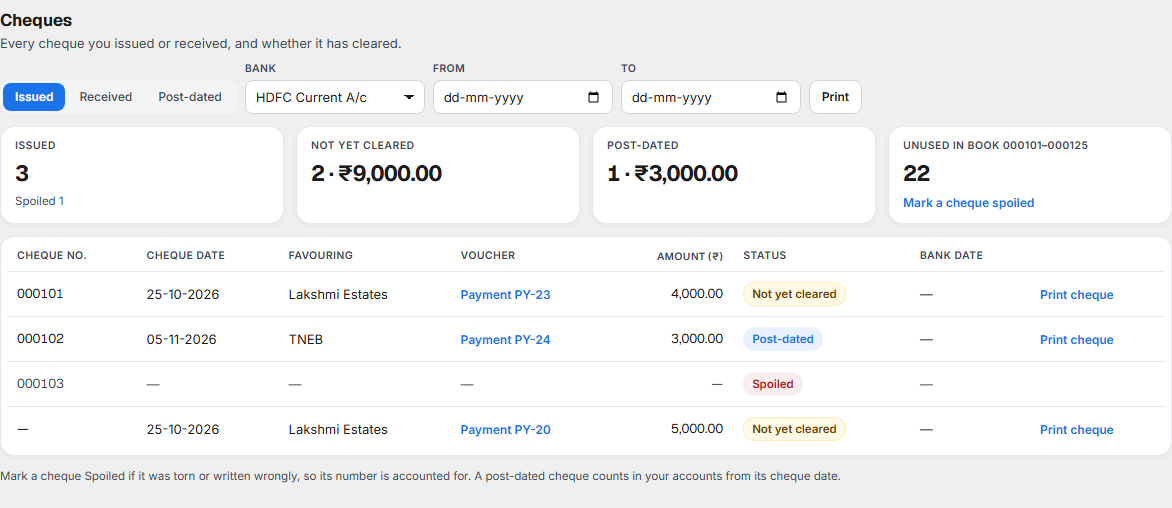
You do not enter a cheque here. A cheque is recorded when you enter a payment or a receipt by cheque in Receipts and Payments. The cheque books are added to the bank account in Bank accounts.
Why it matters for filing
Income tax (ITR) and your bank balance. A cheque you gave is an amount you have already paid, even when the bank has not paid it yet. This register shows which are still out, so your bank balance in Books can be explained against your statement in Bank Reconciliation.
Numbering. Every cheque number should be accounted for. A cheque that is cleared, still out, post-dated, cancelled or spoiled shows its number here.
Post-dated cheques. A post-dated cheque counts in your accounts from its cheque date, not from the day you wrote it.
GST and cash limits. A cheque carries no GST of its own. The GST is on the bill the cheque pays. Paying by cheque keeps you outside the cash limits of the Income-tax Act 2025: ₹10,000 a day to one person for a payment (section 36(4), 36(6)) and ₹20,000 for a loan or deposit (sections 185 and 188).
What each part of the screen shows
Which cheques, bank and period
| Control | What it does |
|---|---|
| Issued / Received / Post-dated | Cheques you gave, cheques you received, or cheques whose date has not come. |
| Bank | The bank account. Each account has its own cheque book. |
| From and To | The period. Leave them empty to see all. |
| Prints the register on a landscape page: Cheques issued — HDFC Current A/c and the period. |
The four figures

| Figure | What it means |
|---|---|
| Issued (or Received, Post-dated) | How many cheques of this kind there are. A spoiled cheque is listed in the register but is not in this count. |
| Not yet cleared | How many are still out, and their total. |
| Post-dated | How many have a cheque date still to come, and their total. |
| Unused in book 000101–000125 | The first and last number of the cheque book, and how many leaves are left. |
Mark a cheque spoiled sits under the last figure. See below.
The register

| Column | What it shows |
|---|---|
| Cheque no. | The number. A dash means the payment was entered without one. |
| Cheque date | The date written on the cheque. |
| Favouring | The name on the cheque, or the party if none was entered. |
| Voucher | The payment or receipt it belongs to, for example Payment PY-23. Select it to open that voucher in Receipts & Payments. |
| Amount (₹) | The amount. |
| Status | See the table below. |
| Bank date | The day the bank cleared it, once you match it in Bank Reconciliation. |
| Print cheque | On a cheque you gave. It opens the cheque ready to print. Not shown for a cancelled or spoiled cheque. |
| Status | What it means |
|---|---|
| Cleared | The bank has paid it and you have matched it. |
| Not yet cleared | Still out. |
| Post-dated | Its cheque date has not come. |
| Cancelled | Its voucher was cancelled. |
| Spoiled | You marked it spoiled. It has no voucher and no amount. |
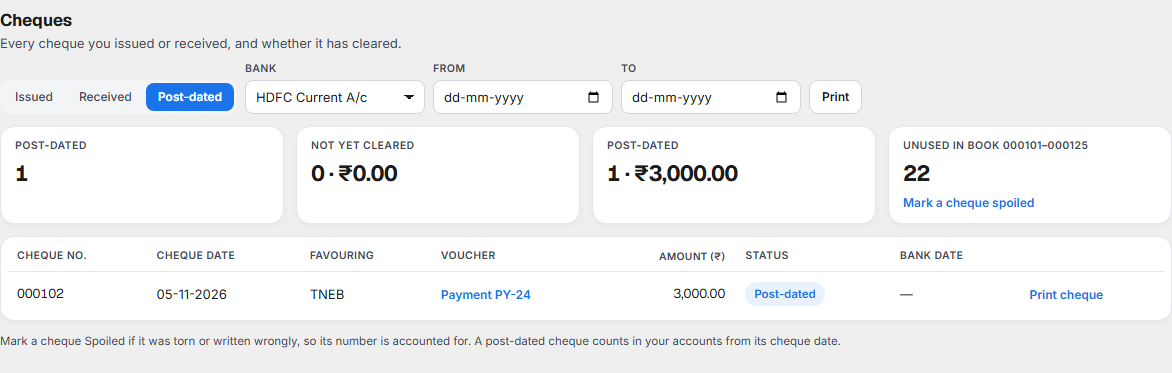
Marking a cheque spoiled
If a cheque is torn or written wrongly and you will not use it, mark it spoiled so its number is accounted for. Select Mark a cheque spoiled.
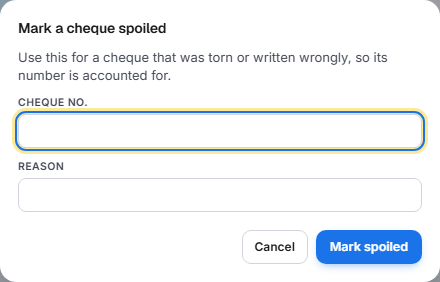
Enter the Cheque no., digits only (Enter the cheque number, digits only (for example 004509).) and a Reason, then select Mark spoiled. The register shows Cheque 004509 marked spoiled, and the leaf is no longer counted as unused.
Printing a cheque
Select Print cheque on a cheque in the register, or on a payment in Receipts and Payments, or tick Print cheque after saving when you enter the payment.
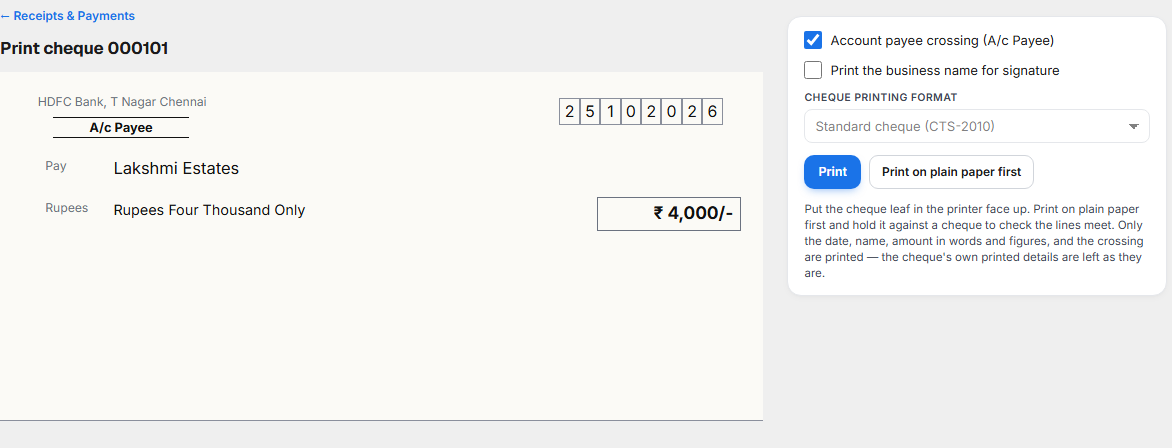
| Choice | What it does |
|---|---|
| Account payee crossing (A/c Payee) | Prints the A/c Payee crossing. |
| Print the business name for signature | Prints For and your business name above the signature space. |
| Cheque printing format | Standard cheque (CTS-2010). Set on the bank account. |
| Prints on the cheque leaf. | |
| Print on plain paper first | Prints the same on plain paper, with the guide lines, so you can check. |
Put the cheque leaf in the printer face up. Print on plain paper first and hold it against a cheque to check the lines meet. Only the date, the name, the amount in words and figures, and the crossing are printed. The cheque's own printed details are left as they are. ← Receipts & Payments takes you back.
Print a test cheque
Before the first real cheque, print a sample. Open the bank account in Chart of Accounts and select Print a test cheque. It is a sample with made-up details, printed on plain paper.
What to do when something needs attention
| You see | What it means | What to do |
|---|---|---|
| Not yet cleared for a cheque you gave long ago | The payee has not banked it, or it has not been matched. | Check your bank statement. If the bank has paid it, match it in Bank Reconciliation. |
| A cheque number is missing between two others | A leaf was used and not entered, or spoiled and not marked. | Mark it spoiled, or enter the payment. |
| Unused in book is 0 or the register has no book | The cheque book is finished or not added. | Add the new book in Bank accounts. |
| No Mark a cheque spoiled link | You do not have access to it. | Ask an administrator. |
| No cheques here yet. | No cheque matches the choice, bank and period. | Change Issued, Received or Post-dated, the Bank or the dates. |
Related
- Receipts and Payments: where a cheque is entered.
- Bank Reconciliation: where it is cleared.
- Bank accounts: the cheque book and the printing format.
- Chart of Accounts and Day Book, Ledger and Journals: the bank ledger and its entries.