Expenses
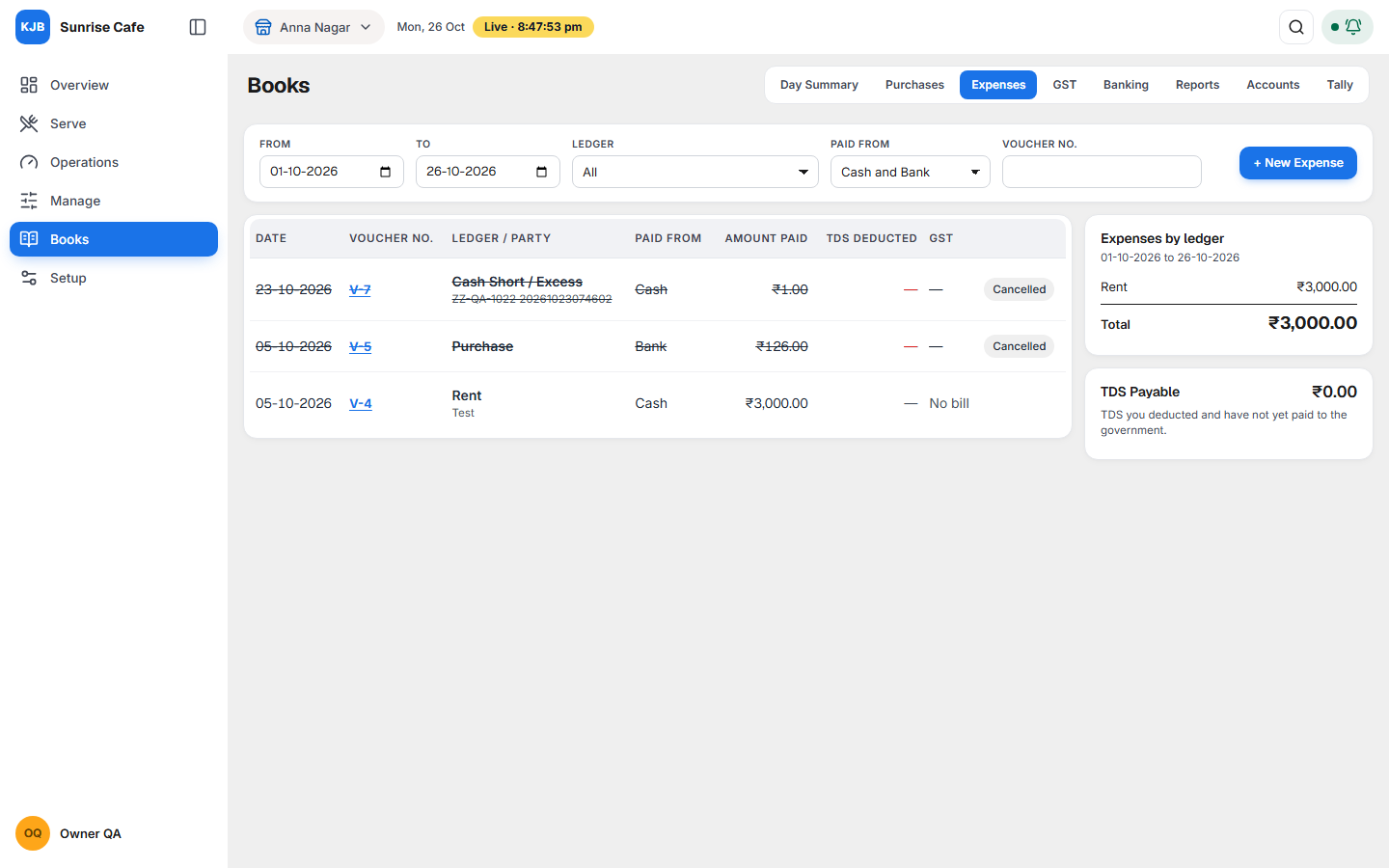
Expenses answers one question: what did I spend, on what, and how did I pay? It is for money you pay out that is not a purchase bill for stock: rent, electricity, gas, salaries, repairs, internet, housekeeping, small cash spends. The screen shows:
- every expense in the period, with how it was paid,
- how much went to each expense ledger (rent, salaries, power and so on),
- GST on the bill, and whether you can claim it,
- TDS you deducted and still owe the government.
Open it from Books, Expenses tab. Supplier bills for stock are in Purchases, not here.
Why it matters for filing
Income tax (ITR). Expenses reduce your profit, and income tax is paid on profit. If an expense is missing, profit looks higher and you pay more tax than you need to. Expense heads matter when you keep regular books (ITR-3). If you file on the presumptive basis (section 44AD, ITR-4), tax is a fixed share of sales and expense heads do not change it.
Cash payments: a payment to one person of more than ₹10,000 in a day, made in cash, is not allowed as an expense for income tax. Pay large amounts from the bank.
GST. It depends on how your outlet bills:
| Your outlet | GST on an expense bill (for example ₹1,000 + ₹180 GST) |
|---|---|
| Restaurant at 5% (most restaurants) | Cannot be claimed. The whole ₹1,180 is your cost. |
| Restaurant in specified premises at 18% (hotel restaurants) | The ₹180 is input tax credit (ITC), money you can set off against the GST you owe, once the supplier has reported the bill and it shows in your GSTR-2B. |
The outlet name at the top of the screen tells you which kind it is, for example Chennai Fine Dine (18% GST).
TDS. If you deducted TDS from rent or a contractor's payment, the amount belongs to the government. KJB keeps it in a ledger called TDS Payable until you record paying it. You still deduct it, pay it and file the TDS return yourself. KJB only records what you did.
What each part of the screen shows
Filters and New Expense

Choose the period with From and To. Narrow the list with Ledger (for example only Rent), Paid from (Cash, Bank or both) or a Voucher No. + New Expense opens a blank expense. The screen shows one outlet, the one named at the top.
The list
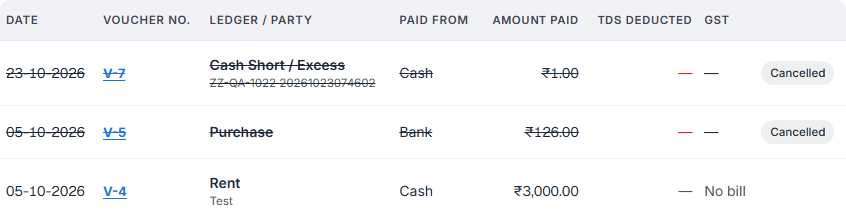
One row per expense. Select the Voucher No. to open it.
| Column | What it shows |
|---|---|
| Ledger / Party | The expense ledger (Rent, Utilities…), and under it the party and the narration. |
| Paid from | Cash, or the bank account, with the UTR or cheque number under it. |
| Amount paid | What actually left your cash or bank. When you deducted TDS, this is the bill amount less the TDS. |
| TDS deducted | The TDS you kept back from this payment. |
| GST | CGST + SGST or IGST when there was a GST bill, with the ITC status under it. No GST or No bill when there was none. |
A voucher is one accounting entry. Each expense is one payment voucher, numbered V-1, V-2 and so on.
The ITC status under the GST chip:
| It says | What it means |
|---|---|
| ITC claimable once in GSTR-2B | The bill can be claimed, but your GSTR-2B for that month has not been uploaded yet, so KJB cannot check it. |
| Claimable | The supplier reported this bill and it is in your GSTR-2B. Claim it in GSTR-3B. |
| Not in 2B yet | Not in your GSTR-2B. Hold the ITC until the supplier files; it counts in the month it appears. |
| Amount differs | In GSTR-2B, but with a different amount. Check the bill with the supplier. |
| ITC not available | In GSTR-2B, but the supplier marked it as not available for credit. |
| ITC not claimable | Your outlet bills at 5%, or the ledger is one where GST can never be claimed. The GST is your cost. |
A Cancelled expense stays in the list, struck through, so the numbering has no gap. A pay-out made from the cash drawer in Operations appears here too, marked From cash drawer. Change it in Operations, not here.
Expenses by ledger
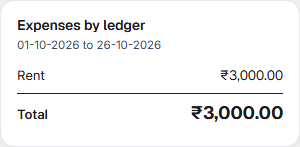
How much went to each expense ledger in the period. This is the amount that reduces your profit.
At an 18% outlet it is the amount before GST, because the GST is claimed back. For example, rent of ₹80,000 with ₹14,400 GST shows as Rent ₹80,000.00. At a 5% outlet the GST is your cost, so it is included. Cancelled expenses and payments of TDS to the government are not counted.
TDS Payable
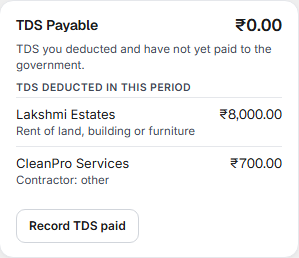
The amount at the top is the TDS you deducted and have not yet paid to the government. Under TDS deducted in this period is each deduction, with the party and the kind of payment. These lines are the deductions made; they are not all still owed. In the screenshot the balance is ₹0.00 because the ₹8,700 deducted in October has been paid.
When you pay the TDS challan, select Record TDS paid. It opens a new expense with the ledger set to TDS Payable. Enter the amount, the date and the bank, and save. The balance goes down by that amount.
A new expense
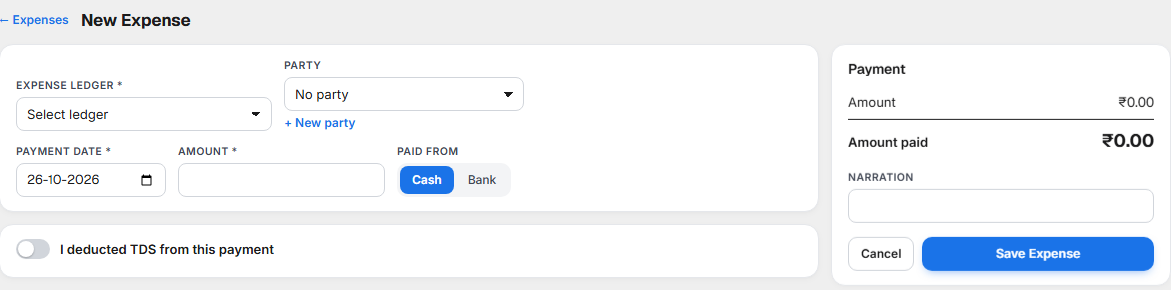
- Choose the Expense ledger: Rent, Utilities, Wages & Salaries and the others in your Chart of Accounts. Only expense ledgers are offered.
- Choose the Party you paid, if any: the landlord, the agency, the gas supplier. Use + New party if they are new. A party's GSTIN and state show next to it.
- Enter the Payment date and Amount, and choose Paid from Cash or Bank. For Bank, choose the bank account and enter the UTR / Cheque No.
- Add the GST bill, reverse charge or TDS if they apply (below).
- Check the Payment summary on the right, write a Narration (a short note such as October rent), and select Save Expense.
Cancel or ← Expenses takes you back without saving.
A GST bill
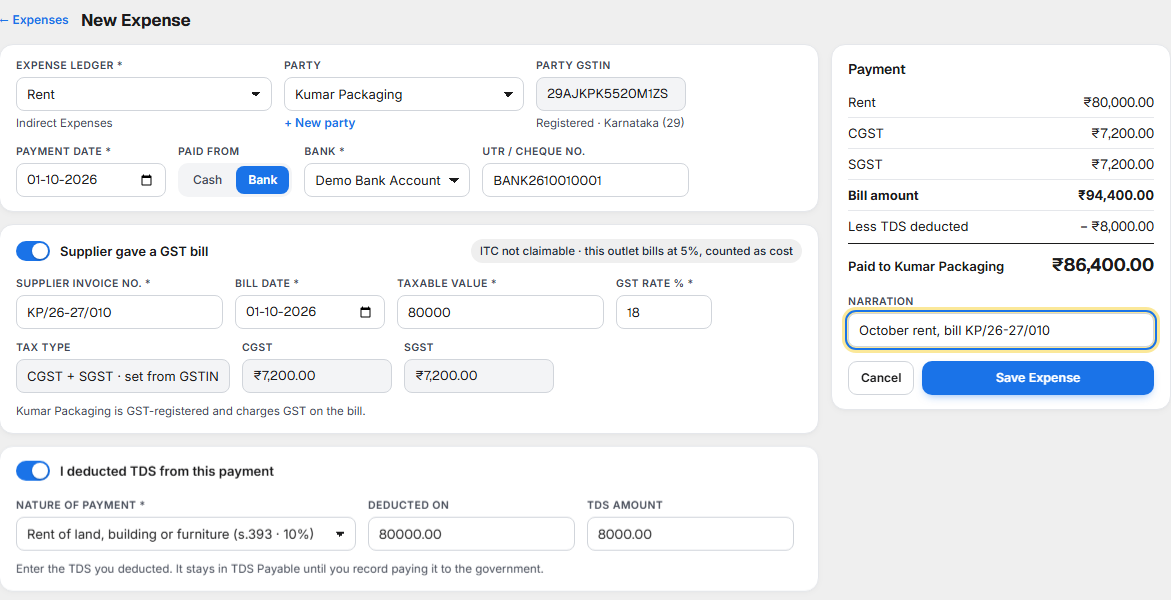
When the party is GST-registered and gave you a tax invoice, switch on Supplier gave a GST bill and enter:
- Supplier Invoice No. and Bill date, exactly as on the bill. KJB matches them with your GSTR-2B.
- Taxable value, the bill amount before GST, and the GST rate %.
KJB works out the tax. Tax type comes from the party's GSTIN:
| Supplier | Tax on the bill |
|---|---|
| In the same state as your outlet | CGST + SGST, half each |
| In another state | IGST, the whole tax |
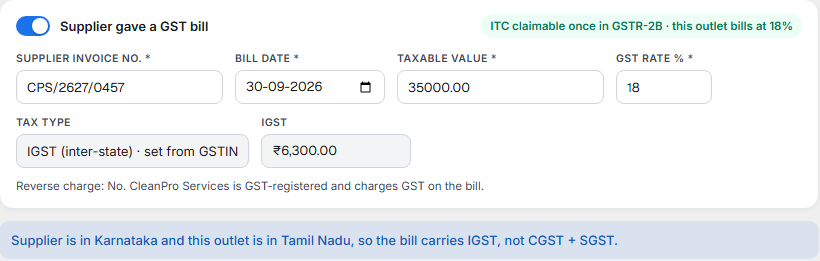
If the bill's tax does not match the states, a note says so. Enter what the bill says and check it with the supplier.
The chip at the top right of the GST bill tells you whether the GST can be claimed (see the table in The list). Some expenses can never be claimed, even at an 18% outlet: food and drinks, motor cars, club membership, works on your building and similar items (CGST Act section 17(5)). When a ledger is marked ineligible for input credit in Chart of Accounts, its GST is always counted as cost.
Reverse charge on rent
Use this when you rent a shop or any building other than a home from a landlord who is not GST-registered. Since October 2024 the law makes the restaurant, not the landlord, pay GST on that rent. It does not apply if your restaurant is under the composition scheme.
Choose the landlord as Party (no GSTIN) and switch on Rent for a shop or other building (not a home) from a landlord who is not GST-registered. Enter the GST rate % and whether the landlord is in another state. KJB works out the tax and gives the expense a Self-invoice No. when you save. The law asks you to issue this invoice to yourself for a purchase from an unregistered supplier.
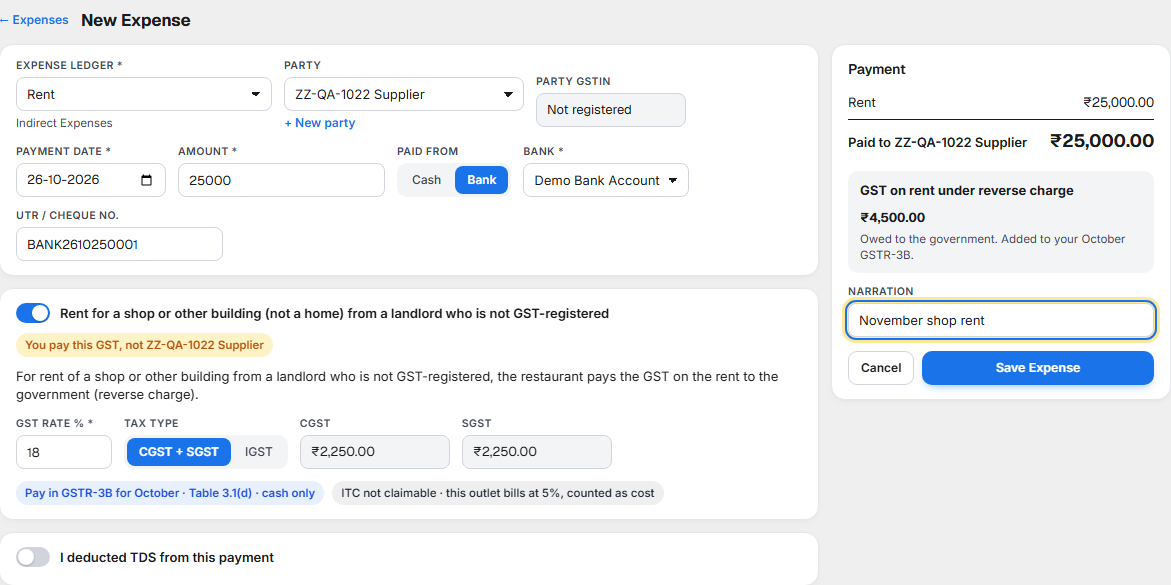
KJB adds the tax to the GSTR-3B of the month of the Payment date. The note under the tax shows which month.
| Your outlet | What happens to the reverse-charge GST |
|---|---|
| 5% | You pay it to the government with your GSTR-3B, in cash (Table 3.1(d)). You cannot claim it back; it is your cost. |
| 18% | You pay it in cash with your GSTR-3B (Table 3.1(d)), and claim it back as ITC in the same return (Table 4A(3)). |
The landlord is paid only the rent. The GST is shown separately as GST on rent under reverse charge: it is owed to the government, not to the landlord.
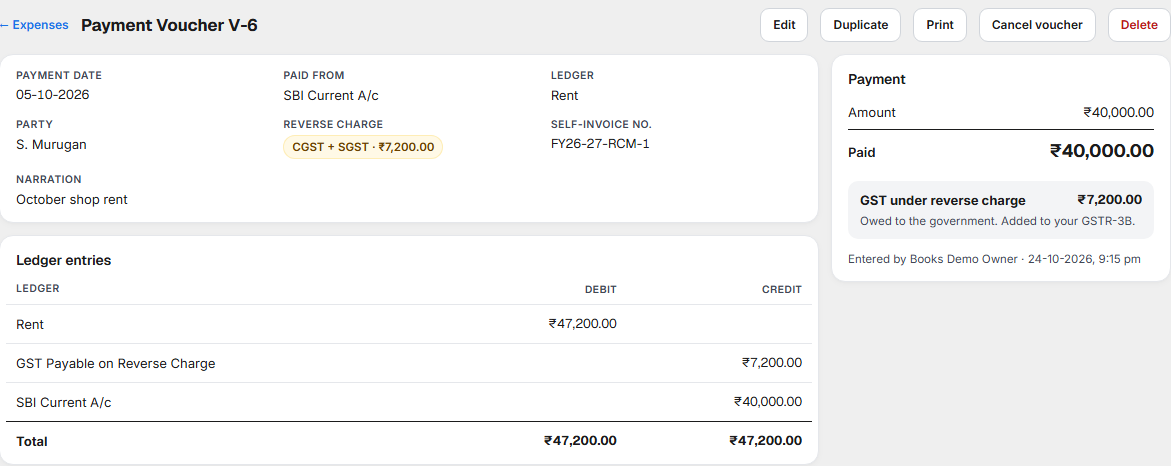
In the ledger entries above, the outlet bills at 5%, so the ₹7,200 GST is added to Rent as cost (₹40,000 + ₹7,200 = ₹47,200). GST Payable on Reverse Charge holds the ₹7,200 until you pay it with your GSTR-3B.
TDS you deducted
Switch on I deducted TDS from this payment when you kept back TDS. Choose the Nature of payment. KJB suggests the amount at the usual rate; change it to what you actually deducted.
| Nature of payment | Rate | When TDS applies |
|---|---|---|
| Rent of land, building or furniture | 10% | Rent above ₹50,000 a month |
| Rent of plant or machinery | 2% | Rent above ₹50,000 a month |
| Rent paid by an individual or HUF not under tax audit | 2% | Rent above ₹50,000 a month |
| Contractor who is an individual or HUF | 1% | Above ₹30,000 for one payment, or ₹1,00,000 in the year |
| Contractor: other (firm, company) | 2% | Above ₹30,000 for one payment, or ₹1,00,000 in the year |
These are the rates of section 393 of the Income-tax Act, 2025, in force from 1 April 2026. A company, a firm, or an individual whose business turnover was above ₹1 crore last year must deduct. TDS deducted in a month is due to the government by the 7th of the next month (30 April for March).
The expense is recorded in full. The party is paid the amount less TDS, and the TDS sits in TDS Payable until you record paying it.
An opened expense
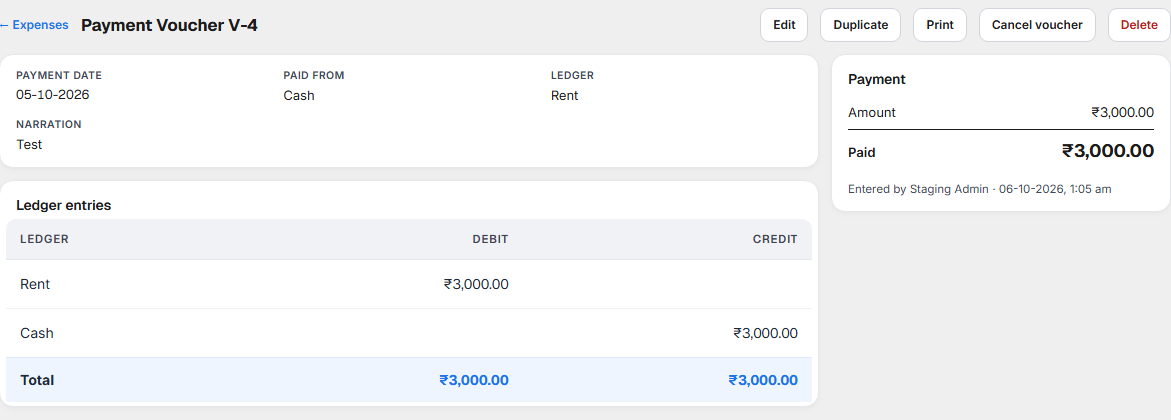
Selecting a voucher number opens the expense: every detail you entered, the Payment summary, and who entered it and when.
Ledger entries shows how the expense is recorded in your accounts. Each line is a ledger. Debit is what the expense added to (Rent, and Input CGST and SGST that you can claim). Credit is where the money came from (the bank) and what you still owe (TDS Payable). Both columns always add up to the same total.
| Button | What it does |
|---|---|
| Edit | Change the expense. The change is kept in the record, as GST law requires. |
| Duplicate | A new expense filled in the same way, dated today. Useful for monthly rent or salaries. |
| A payment voucher slip to print or keep. | |
| Cancel voucher | Ask for a reason, then reverse the expense. It stays in the list as Cancelled, so its number is kept. |
| Delete | Remove the expense from the list and reverse its entries. The deletion is kept in the record. |
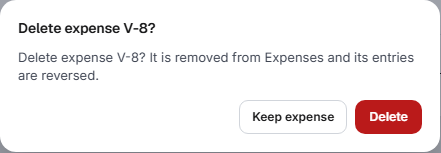
Use Cancel voucher when the payment did not happen; use Delete for an entry made by mistake. A cancelled expense cannot be edited.
What to do when something needs attention
| You see | What it means | What to do |
|---|---|---|
| Not in 2B yet | The supplier has not reported this bill. | Ask the supplier to file it. Claim the ITC in the month it appears in GSTR-2B. |
| Amount differs | The supplier reported a different amount. | Compare your bill with the supplier's. Correct your entry with Edit if you typed it wrong; otherwise ask the supplier to amend. |
| ITC claimable once in GSTR-2B for a past month | That month's GSTR-2B is not uploaded. | Download GSTR-2B from the GST portal and upload it in Purchases ▸ Match GSTR-2B. |
| A balance in TDS Payable after the 7th | TDS deducted last month is not recorded as paid. | Pay the challan, then select Record TDS paid. |
| A note that the bill's tax does not match the states | IGST was entered for a same-state supplier, or CGST + SGST for another state. | Check the bill. If the supplier charged the wrong tax, ask for a corrected invoice. |
| Rent paid to an unregistered landlord without reverse charge | The GST the restaurant owes on that rent is missing. | Open the expense, select Edit and switch on Rent for a shop or other building (not a home) from a landlord who is not GST-registered. |
| An expense in the wrong outlet, ledger or month | It will show in the wrong place in your accounts and returns. | Open it and select Edit. |
The list or an expense could not load. A message says Couldn't load expenses or Couldn't open the expense. Refresh the page, or go back and open it again. If saving fails, the form stays filled in with a message; select Save Expense again.
Related
- Purchases and accounts payable — supplier bills for stock, payments against them, and Match GSTR-2B.
- Chart of Accounts — your expense ledgers, and the setting for GST that can never be claimed.
- Day Book, Journal and Ledger — every expense appears there as a payment voucher.
- Day Summary — cash paid out from the drawer during the day.