Year Close
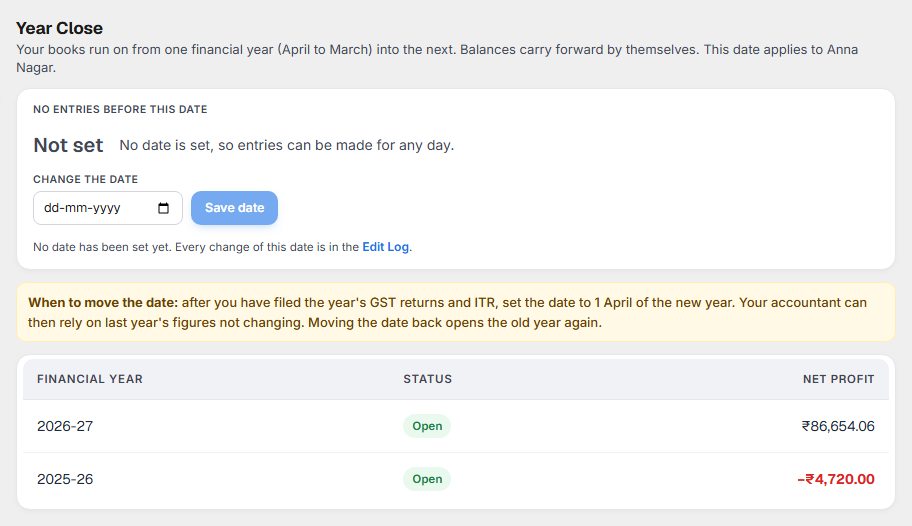
Year Close protects a year you have finished, so its figures cannot change after you file. It shows:
- the No entries before this date for this outlet,
- who set it and when,
- each financial year (April to March), Open or Locked, with its net profit.
Open it from Books ▸ Accounts ▸ Year Close.
Why it matters for filing
Once you have filed your GST returns and your ITR for a year, the figures in them must not change. If someone enters or changes a voucher in that year later, your accounts no longer match what you filed. Your accountant then has to file a correction, or explain the difference.
Setting the date stops that.
There is no closing step
Your books simply run on from one financial year into the next. You do not have to "close" a year:
- balances of cash, bank, suppliers, GST and capital carry into the new year by themselves;
- profit is added up for each year in your Profit & Loss;
- the Balance Sheet carries past profit forward as Profit brought forward.
The only thing you set is No entries before this date.
What each part of the screen shows
No entries before this date
| You see | What it means |
|---|---|
| Not set | Entries can be made for any day. |
| A date, for example 01-04-2026 | Nothing dated on or before 31-03-2026 can be added, altered, cancelled or deleted, in any part of Books. |
To set or move it, choose the date under Change the date and select Save date. The line below shows who set it and when. Every change of this date is in the Edit Log.
The date is for this outlet only. Each outlet keeps its own books and its own date.
When to move the date
After you have filed the year's GST returns (including the annual return) and your ITR, set the date to 1 April of the new year. Moving the date back opens the old year again; do that only with your accountant.
| Situation | Date to set |
|---|---|
| You have filed everything for 2025-26 | 01-04-2026 |
| You also filed GSTR-1 and GSTR-3B for April to September 2026 and want those months fixed | 01-10-2026 |
| You need to correct a voucher in a locked year | Move the date back, correct it, set it again, and tell your accountant |
Financial years
Each year from April to March, with Open or Locked (the whole year is before your date) and its Net profit. A loss shows in red with a minus.
What to do when something needs attention
| You see | What it means | What to do |
|---|---|---|
| "Entries dated before … are locked" when saving a bill, expense or journal | The voucher's date is before your date. | Use a date after it, or ask the owner whether the old year must really change. |
| No Alter, Cancel or Delete on an old voucher | It is in a locked period. | The same as above. |
| A sale from the POS on a locked day | Sales from the counter are still recorded, so the till never stops. | Tell your accountant; the locked year's figures have changed. |