ITR figures
ITR figures answers one question: what do I enter for my business in my income tax return? It shows every business figure of the ITR-4 (Sugam) return for a financial year, filled from your books, in the same order as the form:
- which return you can use,
- your turnover, split by how you were paid,
- the profit the return asks you to declare,
- your turnover as reported for GST,
- what the business owns and owes on 31 March,
- what to check before you file.
Open it from Books ▸ Reports ▸ ITR figures.
Why it matters for filing
Your income tax return is filed once for you, the owner, not once per outlet. This page therefore adds up every outlet of your business that belongs to you (the same PAN in their GSTINs), even though the rest of Books shows one outlet at a time.
KJB fills the business part of the return. The rest of the return is about you as a person: salary from a job, interest on your savings or deposits, deductions such as LIC, PPF or health insurance, and tax already paid. The income tax website fills most of that in by itself from its own records. You check it and add anything missing.
KJB does not file the return for you. You enter these figures on incometax.gov.in and verify the return there.
Which return

Choose the Financial year. Outlets shows which of your outlets are added together.
ITR-4 is for a small business that declares its profit as a fixed share of its turnover (section 44AD). You can use it when your turnover is within the limit:
| Received in cash | Turnover limit for ITR-4 |
|---|---|
| More than 5% of your turnover | ₹2 crore |
| 5% or less | ₹3 crore |
The card says You can use ITR-4, or tells you to use ITR-3 when you are above the limit. ITR-4 is also only for a total income of up to ₹50 lakh. Nature of business is the code the return asks for: 10008 for a restaurant without a bar, 10007 with a bar, 10010 for a caterer.
Gross turnover
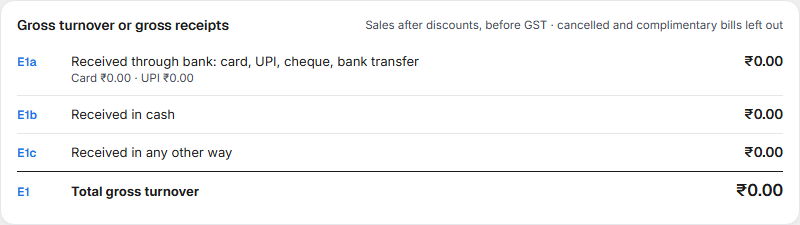
Your sales for the year after discounts and before GST. Cancelled and complimentary bills are left out. Each bill is split by how it was paid:
| Box | What it holds |
|---|---|
| E1a | Paid by card, UPI, cheque or bank transfer. The card and UPI amounts are shown under it. |
| E1b | Paid in cash. |
| E1c | Paid any other way, and bills with no payment recorded. |
| E1 | The total, which goes into the turnover box. |
Presumptive income
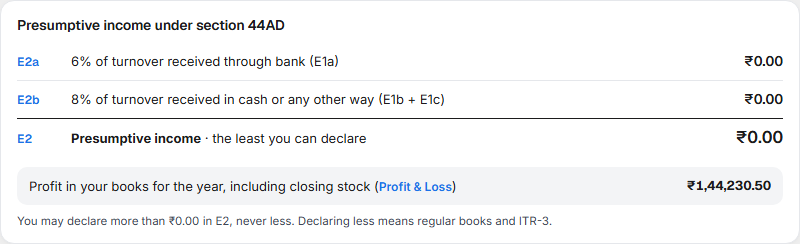
Under ITR-4 your profit is taken as at least:
| Received | Profit taken |
|---|---|
| Through the bank (E1a) | 6% |
| In cash or any other way (E1b + E1c) | 8% |
E2 is the total, the least you can declare. Below it is the profit your books show for the year, including the closing stock you entered. You may declare more than E2, never less. Declaring less than E2 means keeping full books and filing ITR-3 instead.
Turnover as reported for GST

One line per GSTIN. The return has an optional place for it.
Financial particulars
What the business owns and owes on 31 March. Each line comes from your books, except one:
- Inventories: the value of food and supplies in stock on 31 March, at what you paid for them. Your books count quantities, not their value, so you enter this once a year. With more than one outlet you enter one value per outlet, and the total is used. Each value you entered is marked Entered by you.
The two totals, capital and liabilities against assets, must be equal. If the opening balances you entered in Chart of Accounts do not add up, a line Difference in opening balances appears on one side so the totals match, and the checks tell you to correct them before you file.
The closing stock you enter here is also used in Profit & Loss and the Balance Sheet for that year, and as the opening stock of the next year.
Check before you file
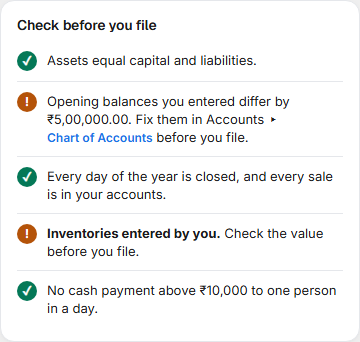
| The line | What to do |
|---|---|
| Assets equal capital and liabilities | Nothing. If it is amber, open the Balance Sheet and find the difference. |
| Opening balances you entered differ by ₹X | Correct the opening balances in Accounts ▸ Chart of Accounts. The return has no place for a difference. |
| N days with bills were not closed | Close those days in Operations ▸ Day Close, so every sale is in your accounts. |
| N bills are not in your accounts yet | Settle or close them, so turnover and accounts agree. |
| Inventories not entered | Enter the closing stock value for each outlet. |
| Cash payments above ₹10,000 to one person in a day | Open the list (below). |
Cash payments above ₹10,000
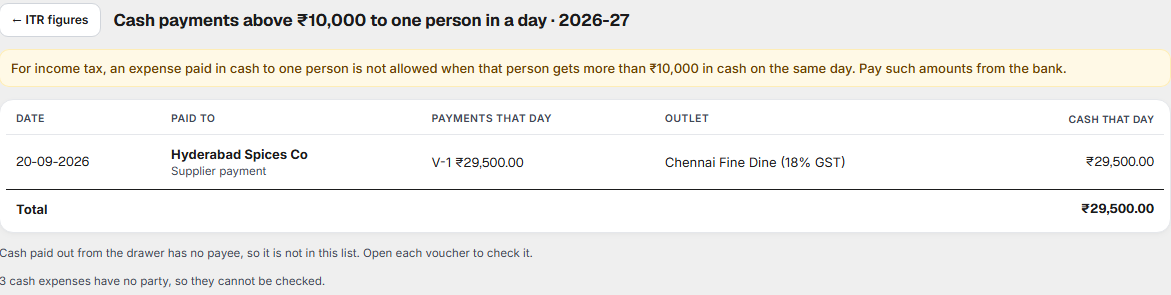
For income tax, an expense paid in cash to one person is not allowed when that person gets more than ₹10,000 in cash on the same day. The list shows each such person and day, with their vouchers. Select a voucher to open it. Pay such amounts from the bank.
Cash paid out from the drawer has no payee, so it cannot be checked here. The page tells you how many there are.
How to file
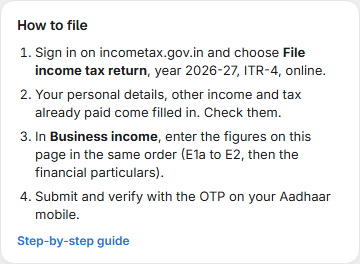
- On incometax.gov.in, choose File income tax return, the year, ITR-4, online.
- Check your personal details, other income and tax already paid, which come filled in.
- In Business income, enter the figures from this page in the same order: E1a to E2, then the financial particulars.
- Submit and verify with the OTP on your Aadhaar mobile.
Download PDF or Download Excel keeps a copy of every figure for your records or your CA.
Related
- Profit & Loss, Balance Sheet and Trial Balance — the figures behind this page.
- Expenses — cash payments and their parties.
- Chart of Accounts — opening balances.