Chart of Accounts
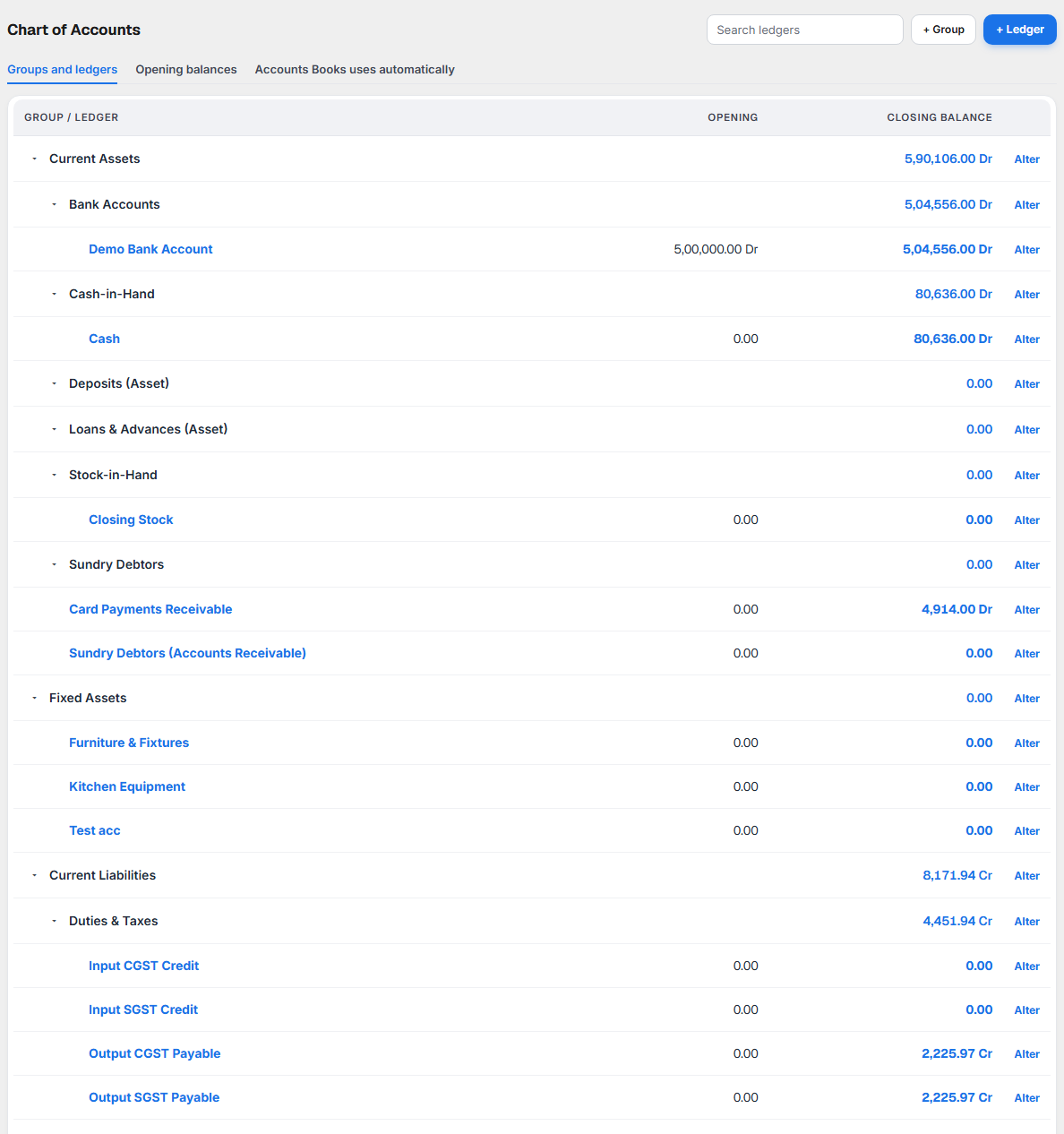
Chart of Accounts is the list of all your accounts, arranged in groups. It shows:
- every group (Bank Accounts, Sundry Creditors, Duties & Taxes, Indirect Expenses…) and the ledgers in it,
- each ledger's opening balance and closing balance,
- the opening balances you started your books with,
- the accounts Books uses by itself when it records a sale, a purchase or GST.
Open it from Books ▸ Accounts ▸ Chart of Accounts.
A ledger is one account: Cash, HDFC Current A/c, Rent, Kumar Packaging, Output CGST Payable. A group is a heading that ledgers sit under, so they add up correctly in your reports.
Why it matters for filing
- ITR. Your Profit & Loss and Balance Sheet are added up group by group. A ledger in the wrong group puts its amount in the wrong place: rent filed under Fixed Assets would make your profit look higher.
- GST. GST you collect and GST credit you claim sit in Duties & Taxes. GST on items the law does not allow you to claim (food for staff, for example) must be marked so it counts as cost, not credit.
- Opening balances. If they are wrong, your Balance Sheet is wrong from the first day.
The groups
Books gives every restaurant 28 standard groups. You cannot rename or move them, but you can add your own groups under them.
| Primary group | Sub-groups | Used for |
|---|---|---|
| Capital Account | Reserves & Surplus | Money the owner put in; profit kept in the business |
| Loans (Liability) | Bank OD A/c, Secured Loans, Unsecured Loans | Money borrowed |
| Current Liabilities | Duties & Taxes, Provisions, Sundry Creditors | GST and TDS payable; suppliers you owe |
| Fixed Assets | Kitchen equipment, furniture | |
| Investments | Fixed deposits and other investments | |
| Current Assets | Bank Accounts, Cash-in-Hand, Deposits (Asset), Loans & Advances (Asset), Stock-in-Hand, Sundry Debtors | Money you have or are owed; GST input credit is shown under Duties & Taxes |
| Misc. Expenses (ASSET), Suspense A/c, Branch/Divisions | Rarely used by restaurants | |
| Sales Accounts | Your sales | |
| Purchase Accounts | Raw material and stock you buy | |
| Direct Expenses, Direct Incomes | Costs and income directly tied to what you sell | |
| Indirect Expenses | Rent, wages, electricity, repairs, round off | |
| Indirect Incomes | Other income, such as interest |
Sundry Creditors are your suppliers: each supplier has its own ledger here. Duties & Taxes holds Output CGST and SGST Payable (GST you collected), Input CGST, SGST and IGST Credit (GST you can claim), TDS Payable and GST Payable on Reverse Charge.
What each part of the screen shows

Groups and ledgers
The tree of groups and ledgers. Click the arrow beside a group to open or close it. Search ledgers finds a ledger by name. Each row shows:
| Column | What it means |
|---|---|
| Opening | The ledger's balance on the day your books start. |
| Closing balance | The balance today for the financial year, with Dr or Cr. For a group, the total of its ledgers. |
Click a ledger's name to open its Ledger. Select Alter to change it.
Adding or changing a group
+ Group asks for a Name and Under, the group it sits in. Alter on a group you made lets you rename or move it. The standard groups cannot be changed.
Adding or changing a ledger
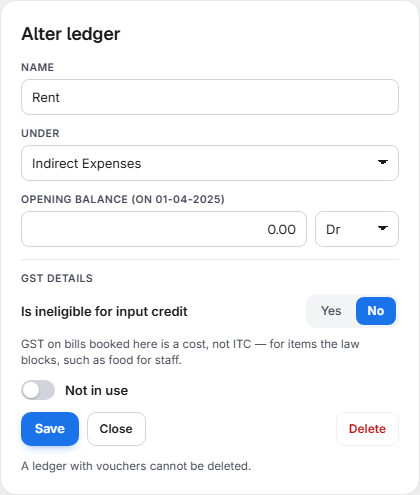
+ Ledger and Alter on a ledger open the same panel beside the list:
| Field | What to enter |
|---|---|
| Name | The ledger's name, for example Electricity Charges. |
| Under | The group. Choose carefully: this decides where it shows in your Profit & Loss and Balance Sheet. |
| Opening balance and Dr / Cr | The balance on the day your books start, and which side. |
| Is ineligible for input credit | Yes for an expense whose GST the law does not let you claim. See below. |
| Not in use | Hides a ledger you no longer use from the lists. Turn it off to use the ledger again. |
Delete removes a ledger only if it has no vouchers, no opening balance, and Books does not use it by itself. Otherwise the panel tells you why it cannot be deleted.
Is ineligible for input credit
This setting is for blocked credit. GST law (CGST Act, section 17(5)) does not let a business claim GST paid on some things, for example:
- food and drinks for staff,
- motor vehicles,
- building repairs that become part of the building.
Mark the ledger once: Is ineligible for input credit: Yes. From then on, the GST on every purchase bill or expense booked to that ledger is added to the cost. It is not counted as GST credit in your GSTR-3B.
| Your outlet | GST on purchases | What this setting changes |
|---|---|---|
| 5% restaurant (no ITC) | Always a cost | Nothing: you cannot claim any GST credit |
| 18% restaurant (specified premises, with ITC) | Credit you can claim | Makes the GST on this ledger a cost instead |
Opening balances
What each ledger held on the day you started your books in KJB: cash in hand, money in each bank, what you owed each supplier, the value of equipment, the capital you put in. Open it from the Opening balances link; ← Chart of Accounts takes you back.
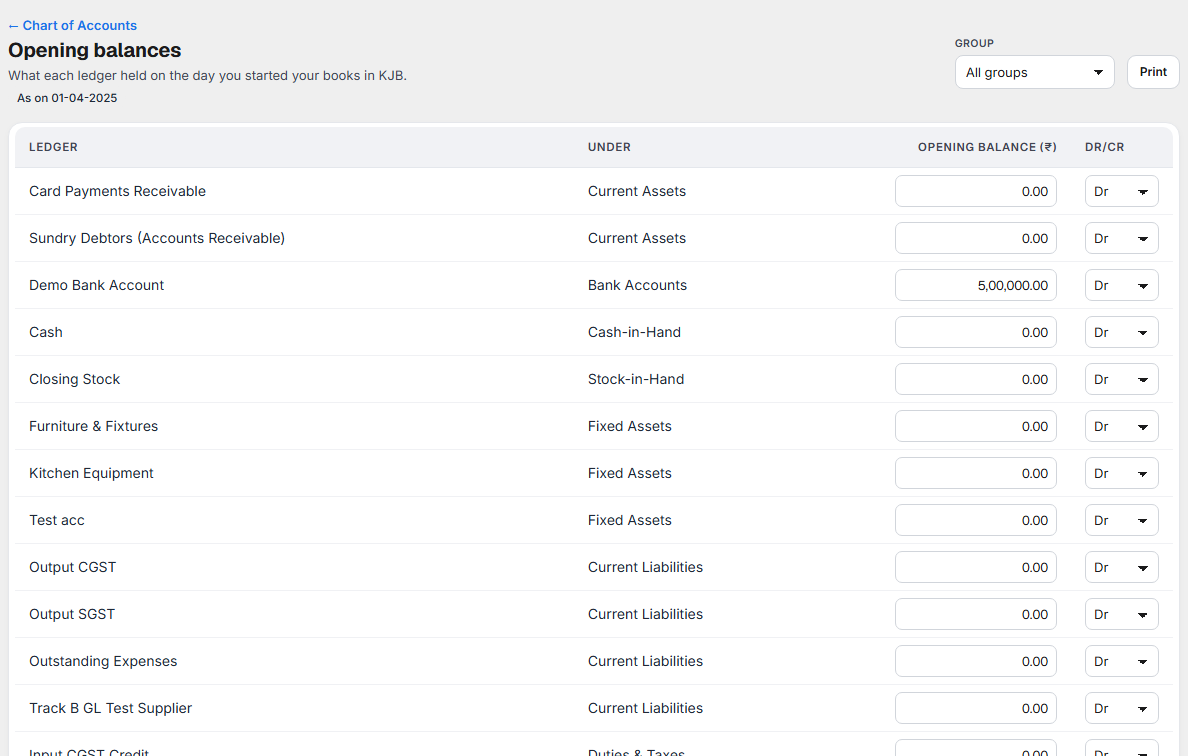
For each ledger enter the amount and choose Dr or Cr:
| Ledger | Usually |
|---|---|
| Cash, bank, equipment, GST input credit | Dr |
| Suppliers you owe, loans, owner's capital, GST payable | Cr |
The page shows Total Debit, Total Credit and the Difference in opening balances. The two totals should match. When they do not, the difference is shown on your Balance Sheet as Difference in opening balances until you add the ledger that is missing, often a loan or the owner's capital. Select Save opening balances when done. Print prints the list.
Accounts Books uses automatically
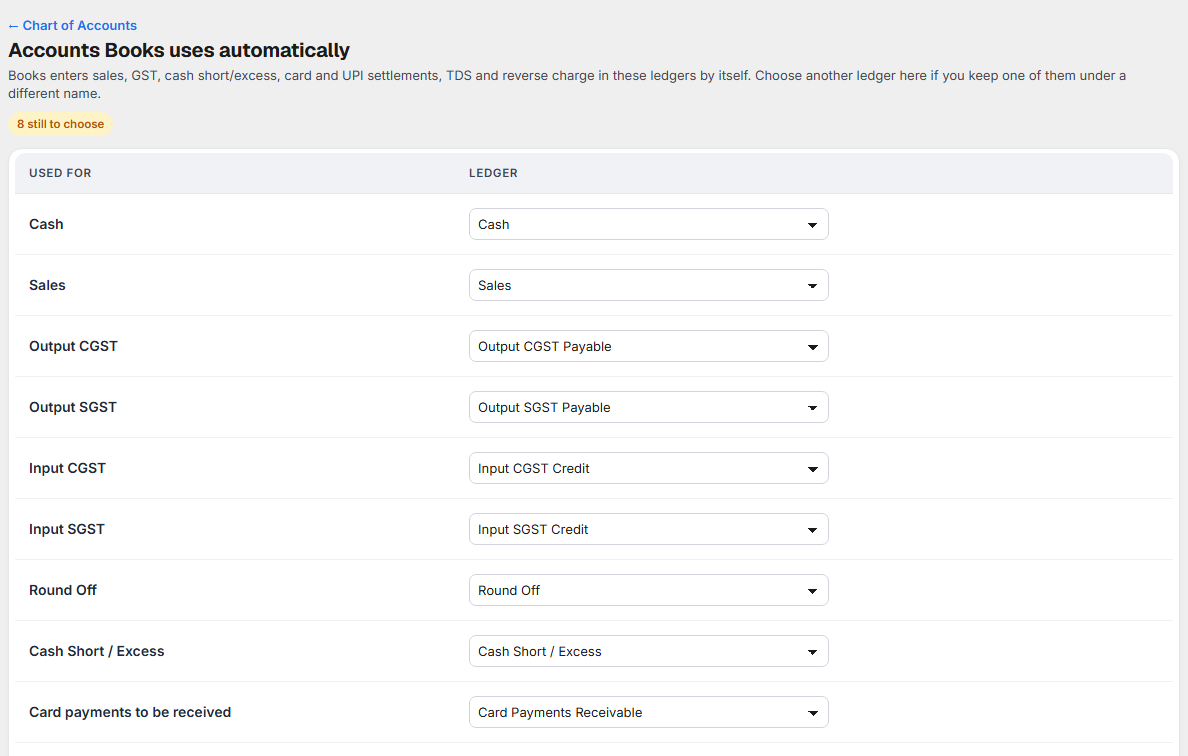
When Books records a sale, a purchase bill, GST, a cash short or excess, or a round off, it needs to know which ledger to use. This page lists each one with its ledger:
| Line | Ledger it uses |
|---|---|
| Cash | Cash |
| Sales | Sales |
| Purchases | Purchase |
| Output CGST, Output SGST | Output CGST Payable, Output SGST Payable |
| Input CGST, Input SGST, Input IGST | Input CGST Credit, Input SGST Credit, Input IGST Credit |
| TDS Payable | TDS Payable |
| GST Payable on Reverse Charge | GST Payable on Reverse Charge |
| Round Off | Round Off |
| Cash Short / Excess | Cash Short / Excess |
| Card payments to be received | Card Payments Receivable |
| Reserves & Surplus | Retained Earnings |
| Sundry Creditors group | Sundry Creditors (where new supplier ledgers are made) |
Change a line only if your accountant asks you to. Select Save after a change.
What to do when something needs attention
| You see | What it means | What to do |
|---|---|---|
| A ledger's closing balance is on the wrong side | A voucher may be in the wrong ledger, or the opening balance has the wrong Dr/Cr. | Open the ledger and check its vouchers; check its opening balance. |
| Difference in opening balances is not zero | Your opening balances do not add up. | Add the missing ledger (a loan, capital) or correct a Dr/Cr. |
| Delete is refused | The ledger has vouchers or an opening balance, or Books uses it. | Leave it. A ledger with vouchers cannot be deleted. |
| Day Summary says a sale cannot be recorded because a ledger is not linked | A line under Accounts Books uses automatically has no ledger. | Choose the ledger on that line and save. |
| GST credit looks too high | An expense that is blocked by law is not marked. | Set Is ineligible for input credit: Yes on that ledger. |