Bank Reconciliation
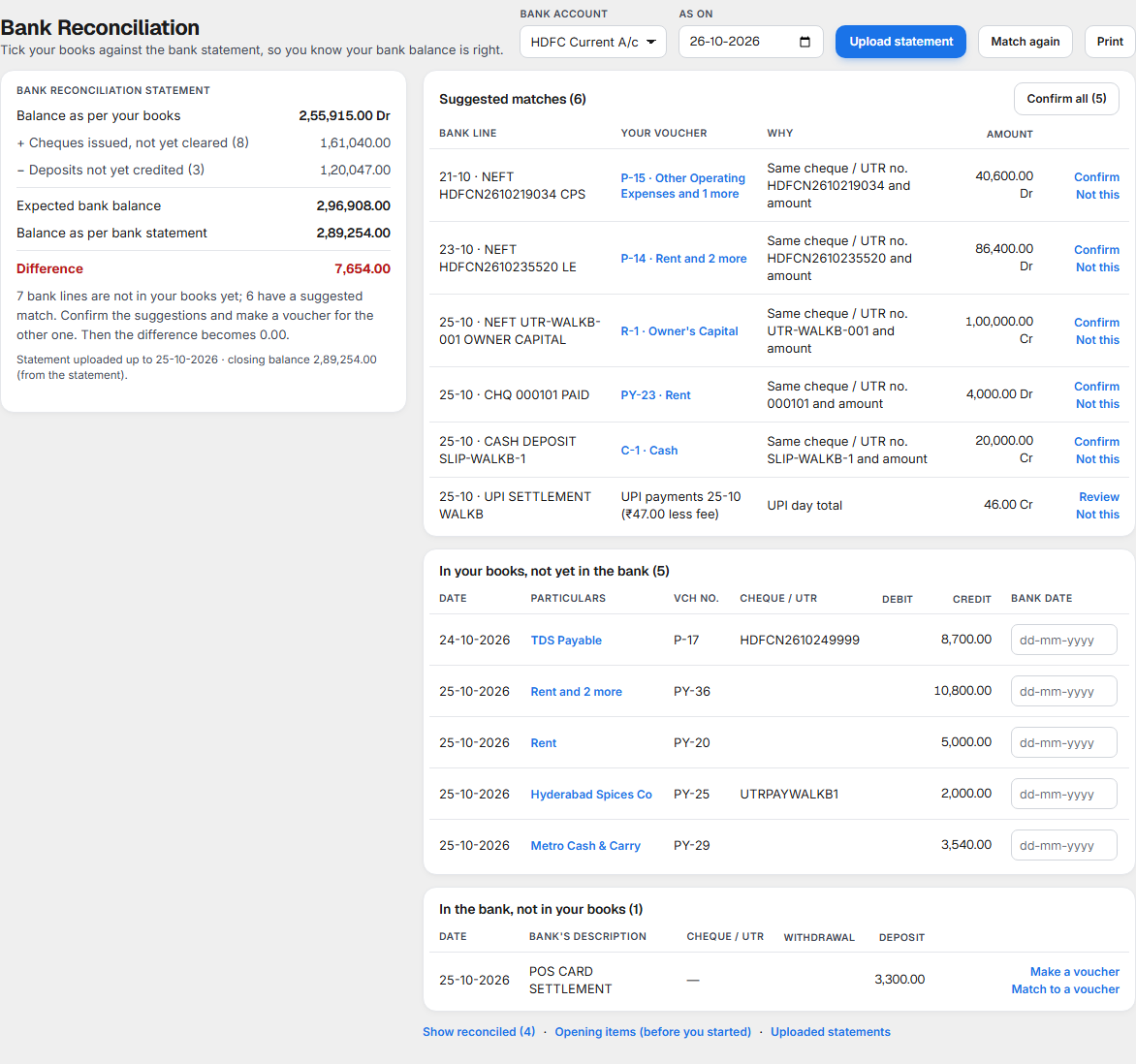
Bank Reconciliation ticks your books against your bank statement, so you know the bank balance in Books is right. For each bank account it shows:
- the balance your books expect the bank to show, and the balance on the statement,
- the Difference between them, which must reach 0.00,
- the bank lines that match a voucher, the bank lines that have no voucher yet, and the vouchers the bank has not shown yet.
Open it from Books ▸ Banking ▸ Bank Reconciliation. The bank account must first be added in Chart of Accounts; see Bank accounts.
Why it matters for filing
Income tax (ITR). Your Balance Sheet shows your bank balance. If the bank charged you, or paid you interest, and your books do not know, the balance, your expenses and your income are all wrong. Interest the bank paid you is income. Bank charges and card fees are expenses. Reconciliation finds both.
GST. Banks and card or UPI providers charge GST on their charges and fees:
| Charge | GST | Can you claim it? |
|---|---|---|
| Bank charges, and card or UPI fees | 18% (9% CGST + 9% SGST), Notification 11/2017-CT(Rate), serial 15 | Section 17(5) of the CGST Act does not block it. At an outlet that takes input tax credit (a restaurant in specified premises at 18%) you can claim it. At a 5% restaurant, which does not take input tax credit, the GST is part of the cost. |
To claim the GST you need the bank's GSTIN from its invoice. Without it, Books adds the GST to the charge as a cost.
What the bank may charge you. These rules change what you will see on the statement:
| Payment | Charge to you | From | Source |
|---|---|---|---|
| RuPay debit card, any amount | None | 14 September 2026 | S.O. 5067(E), section 10A of the Payment and Settlement Systems Act as amended in 2026 |
| UPI up to ₹2,000 | None | 14 September 2026 | The same |
| UPI above ₹2,000 | 0.4%, at most ₹300 | 15 October 2026 | Department of Financial Services FAQ of 15 September 2026 |
| UPI by QR, up to ₹1 lakh a month | None, for small merchants | 15 October 2026 | The same |
So a UPI day of small bills reaches your bank without a fee, and a day with larger UPI bills may show one. The fee is the figure on the statement your provider sends. You enter it; Books does not work it out.
What each part of the screen shows
Bank account, date and buttons

| Control | What it does |
|---|---|
| Bank account | The account you are reconciling. Each account has its own statement and its own list. |
| As on | The date of the figures. It starts as today. |
| Upload statement | Opens the page to upload your bank's statement. |
| Match again | Looks for matches again, for example after you enter a new voucher. It says how many new matches were suggested, or No new matches found. |
| Prints the Bank Reconciliation Statement with the two lists. |
If you have no bank account yet, the screen says No bank account yet and tells you to add a bank ledger in Chart of Accounts.
Bank Reconciliation Statement
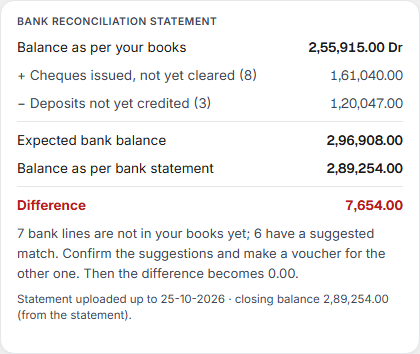
| Line | What it means |
|---|---|
| Balance as per your books | What your accounts say is in the bank, with Dr for money you have. |
| + Cheques issued, not yet cleared | Cheques and payments you made that the bank has not paid yet. The number in brackets is how many. They are still in your bank, so they are added back. |
| − Deposits not yet credited | Money you banked or received that the bank has not credited yet. They are not in the bank yet, so they are taken off. |
| Expected bank balance | What the statement should show: the three lines above added up. |
| Balance as per bank statement | The closing balance of the statement you uploaded. Until you upload one it says No bank statement uploaded. |
| Difference | Expected less statement. In green when it is 0.00, in red when it is not. |
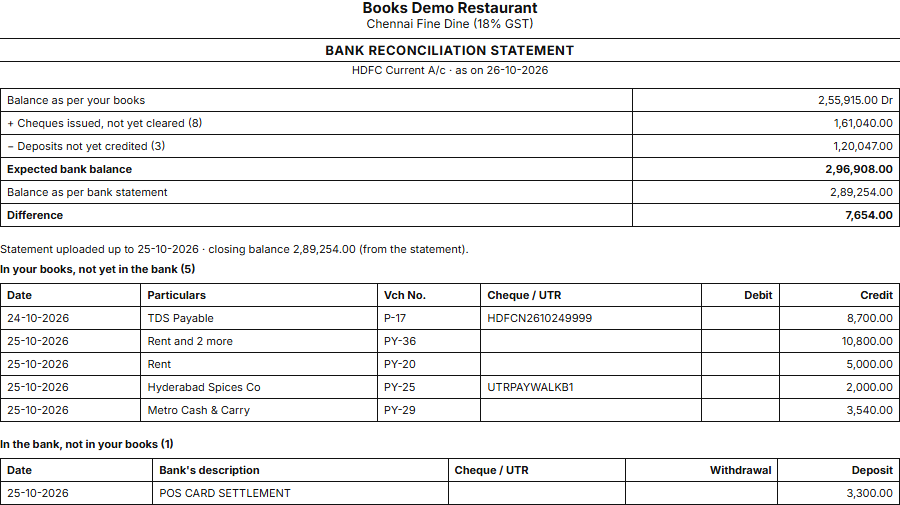
In the picture: 2,55,915.00 + 1,61,040.00 − 1,20,047.00 = 2,96,908.00 expected, against 2,89,254.00 on the statement, so the difference is 7,654.00. Under the figures, a sentence tells you what to do, for example 7 bank lines are not in your books yet; 6 have a suggested match. Confirm the suggestions and make a voucher for the other one. When the difference is 0.00 it says Your books and the bank statement agree. The last line says up to which date the statement runs.
Uploading a bank statement
Select Upload statement. Download the statement from your bank's net banking as Excel (.xlsx, .xls) or CSV, and choose it here. Nothing is sent to the bank.
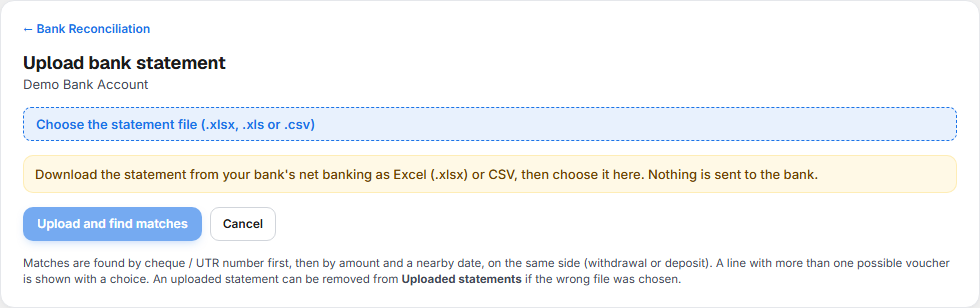
After you choose the file, the page shows its name, how many lines it has and the dates it covers.
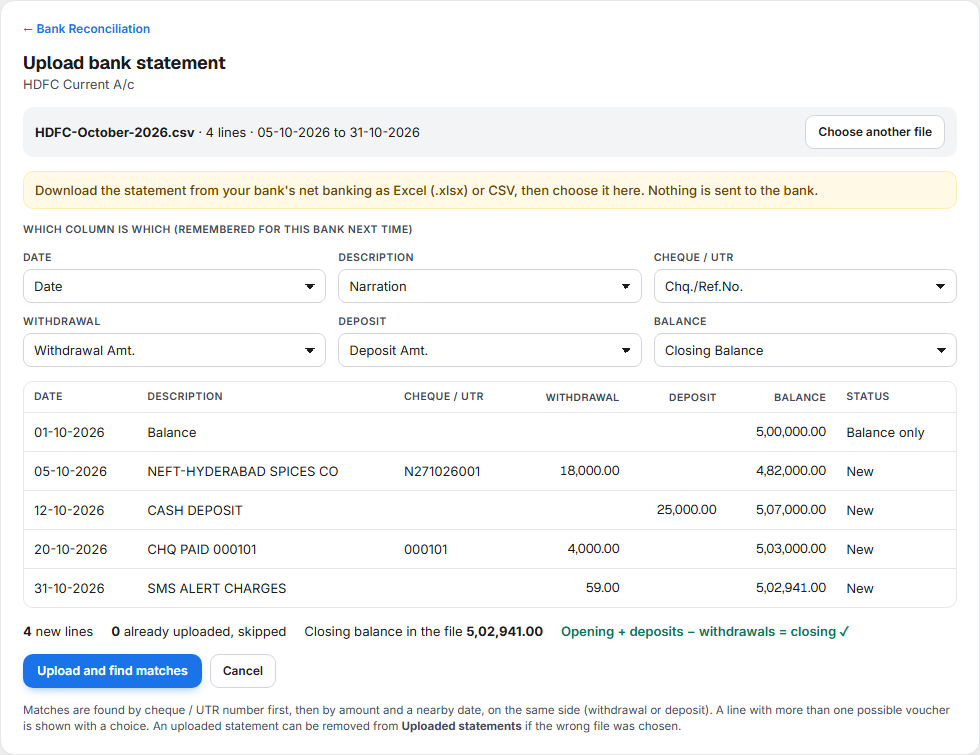
- Which column is which. Books guesses from the headings. Check Date, Description, Cheque / UTR, Withdrawal, Deposit and Balance and change any that are wrong. You must choose the date, and a Withdrawal column, a Deposit column or both. The choice is remembered for this bank, so the next statement needs no change.
- Check the rows. Each row shows its status:
| Status | What it means |
|---|---|
| New | It will be uploaded. |
| Already uploaded — skipped | You uploaded this line before. It is not added twice, so statements may overlap. |
| Balance only | The opening balance row. It is not a transaction. |
| Not read — … | The row has a problem: An amount is not a number, The date is missing or not understood, or A row has both a withdrawal and a deposit. It is left out. |
The first 60 rows are shown. All of them are uploaded. 3. Check the balance. Under the rows you see how many lines are new, how many are skipped, and the closing balance in the file, with one of these:
| Message | What it means |
|---|---|
| Opening + deposits − withdrawals = closing ✓ | The file has every line. |
| Opening + deposits − withdrawals ≠ closing ✗ (off by …) | A line is missing from the file. Download it again before you upload. |
| No balance column, so the totals are not checked. | The file has no balance column. |
- Select Upload and find matches. Books tells you how many lines were uploaded, skipped and not read, and how many matches were found, then See the matches takes you to them.
If no answer comes back in time, the page says the statement may already be saved. Look in Uploaded statements before you upload it again.
Matching the bank lines to your vouchers
Books looks at each line of the statement and tries to find your voucher for it:
| It looks for | When it finds it |
|---|---|
| The same cheque or UTR number and the same amount | The line is suggested with that voucher. |
| Failing that, the same amount on the same side (a withdrawal or a deposit) within 7 days | The line is suggested with that voucher. The reason says, for example, Same amount and side, 3 days apart. |
Suggested matches
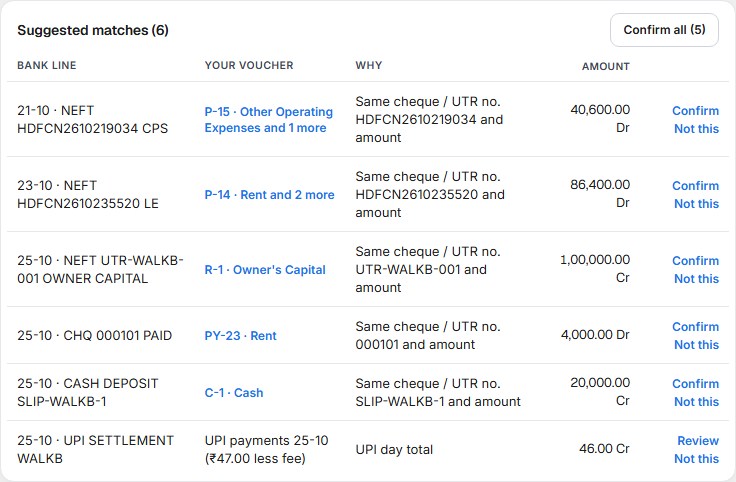
| Control | What it does |
|---|---|
| Voucher name, for example P-15 · Other Operating Expenses | Opens that voucher. |
| Confirm | Accepts the match. The voucher gets the bank date of the line. |
| Not this | Drops the suggestion. The line goes to In the bank, not in your books. |
| Confirm all | Accepts every simple suggestion at once. It says how many were confirmed. Card and UPI suggestions are not included. |
| Review | Shown for card or UPI money. See below. |
When more than one voucher fits a line, the row says n vouchers fit. Choose one below. and lists them, each with Use this.
In your books, not yet in the bank
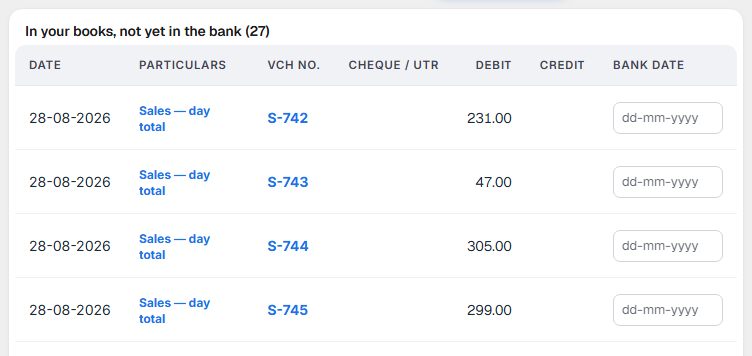
Vouchers the bank has not shown. They are the cheques you have given and the deposits not yet credited. Most are waiting for the bank. If you know the day the bank cleared one, type it in Bank date as dd-mm-yyyy and press Enter. The voucher moves to the reconciled list. A voucher that cannot take a bank date says Match it to a bank line.
A post-dated cheque counts in your books only from its cheque date.
In the bank, not in your books

The bank did something your books do not know about: charged you, paid you interest, took a payment, credited a deposit. For each line:
- Match to a voucher lets you choose an existing voucher of the same amount.
- Make a voucher makes the missing voucher from the bank line.
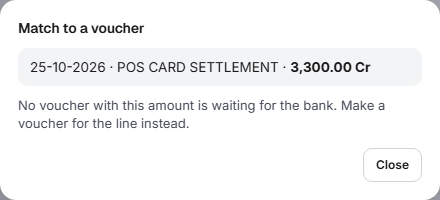
Under UPI money of one day, Match this day matches a credit to a day's UPI bills.
Make a voucher from a bank line
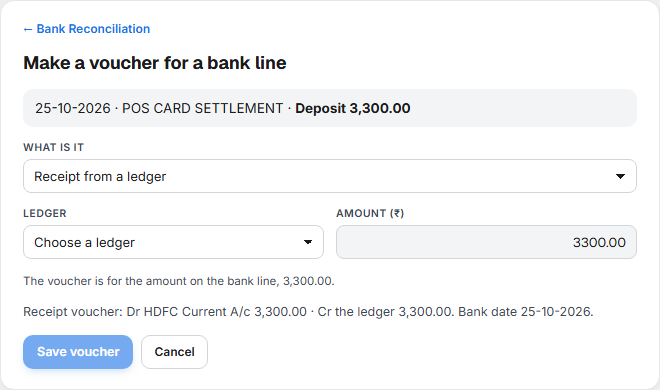
Choose What is it. The list depends on whether the line is a withdrawal or a deposit.
| Choice | For a | Voucher made |
|---|---|---|
| Bank charges | Withdrawal | Payment: the charge to an expense ledger, and the bank |
| Interest received | Deposit | Receipt: the bank, and an income ledger |
| Payment to a ledger | Withdrawal | Payment |
| Receipt from a ledger | Deposit | Receipt |
| Cash withdrawn / deposited (Contra) | Either | Contra |
Then choose the Ledger. The amount is the amount on the bank line and cannot be changed. A line below shows the entry that will be made, for example Dr Bank Charges · Cr HDFC Current A/c, dated the day of the bank line.
A payment or a receipt never goes to Cash or to a bank. That is a Contra. For Payment to a ledger and Receipt from a ledger the list shows ledgers other than cash and bank. For Cash withdrawn / deposited (Contra) it shows only cash and bank ledgers.
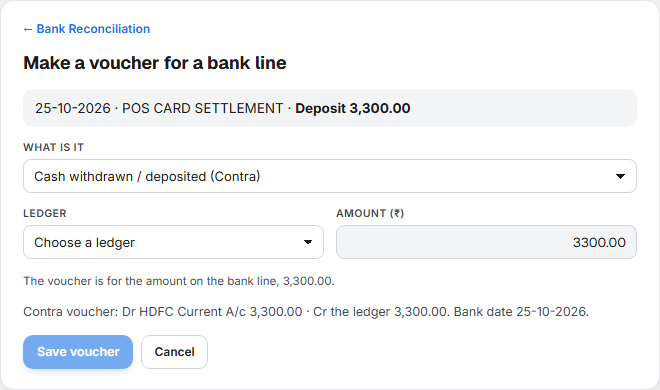
Bank charges with GST
For Bank charges, tick The bank charged GST on this if the bank's invoice shows GST. Enter:
| Field | What to enter |
|---|---|
| GST on the charges (₹) | The GST shown on the invoice. It must be less than the amount the bank took. |
| Bank's GSTIN (from its invoice) | 15 letters and digits. |
The entry then reads Dr Bank Charges · Dr GST on the charges (input credit if your outlet takes it, otherwise part of the cost) · Cr the bank.
| Situation | What Books does |
|---|---|
| GSTIN entered, outlet takes input tax credit (18%) | The GST is claimed as input credit. After saving: The GST is claimed as input credit. |
| GSTIN entered, 5% outlet | The GST is part of the cost. After saving: The GST is kept in the cost. |
| No GSTIN | Without the bank's GSTIN the GST is added to the charges as a cost. |
Select Save voucher. The voucher is saved and matched to the bank line in one step: The voucher is saved and matched to the bank line. The voucher appears in Receipts & Payments.
Card and UPI money
When a customer pays by card or UPI, the sale is already in your books from Day Summary as money still to be received from the bank. A day or two later the bank credits you the day's total less its fee. Books suggests this match when the credit is the day's bills less up to 5%, and shows the line with Review.
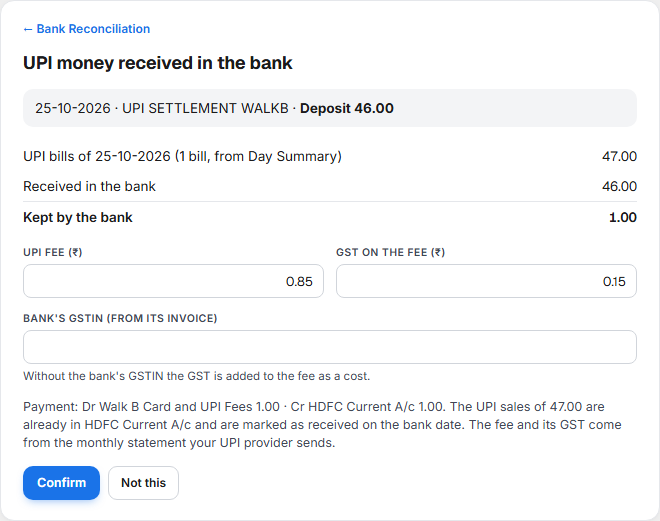
| Line | What it means |
|---|---|
| UPI bills of 25-10-2026 (1 bill, from Day Summary) | The day's bills that are waiting for the bank. |
| Received in the bank | The credit on the statement. |
| Kept by the bank | The difference: the fee and the GST on it. |
| UPI fee (₹) and GST on the fee (₹) | Books splits the kept amount into the fee and 18% GST. Change either box and the other follows, because the two must add up to what the bank kept. Take the figures from the monthly statement your provider sends. |
| Bank's GSTIN (from its invoice) | Enter it to claim the GST where your outlet takes input credit. Without it, the GST is added to the fee as a cost. |
Select Confirm: The bank credit is matched, with the fee and its GST booked. Not this drops the suggestion.
For card money the panel is the same, with Card money received in the bank. A bank credit may cover more than one day. Select Pick other card days to see Card days waiting for the bank and tick each day the credit covers. The bills and the fee are worked out again for the days you ticked. If you tick none: Tick the card days this bank credit covers.
| Message | What it means |
|---|---|
| The bank paid more than the bills add up to. Pick other days, or use Not this. | The credit is larger than the bills. Tick more days or drop the suggestion. |
| The fee and its GST must add up to …, what the bank kept. | The two boxes do not match the kept amount. |
| No ledger is set for card fees. | Choose the card fees ledger in Chart of Accounts ▸ Accounts Books uses automatically. |
Reconciled lines, opening items and uploaded statements
Under the lists are three links: Show reconciled, Opening items (before you started) and Uploaded statements.
Show reconciled
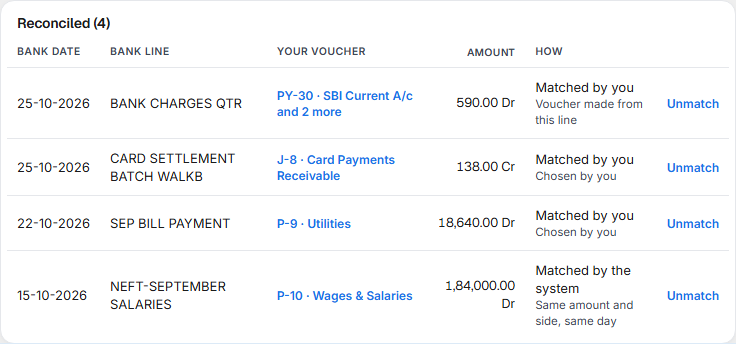
Every match, with the Bank date. How says Matched by the system, Matched by you or Bank date typed, with the reason. Unmatch undoes a match: the line goes back to In the bank, not in your books and the voucher back to not yet in the bank. For a bank date you typed, the link is Remove bank date. A long list is split into pages with Previous and Next.
Opening items (before you started)
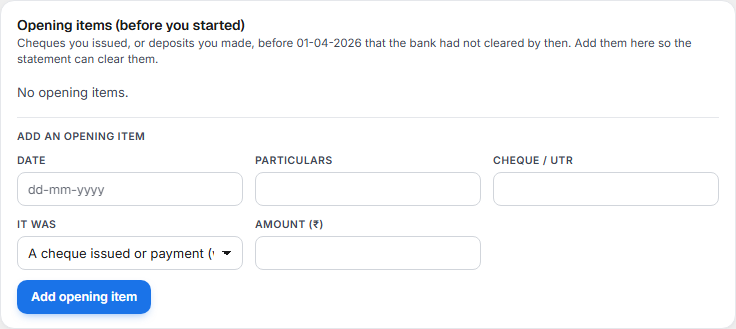
If you started in Books on a date, for example 01-04-2026, some cheques you gave and some deposits you made before it may not have been cleared by the bank by then. The bank will show them on your first statements. Add each as an opening item so the statement can clear it:
| Field | What to enter |
|---|---|
| Date | Before the Reconcile from date of the bank ledger: The date must be before …, when reconciliation starts. |
| Particulars | What it was for. |
| Cheque / UTR | The number, if any. |
| It was | A cheque issued or payment (withdrawal) or A deposit made (not yet credited). |
| Amount (₹) | The amount. |
Select Add opening item. Its status is Not yet cleared until a bank line matches it, then Cleared with the date. Remove opening item is only for one that is not cleared. The Reconcile from date is set on the bank ledger; see Bank accounts.
Uploaded statements
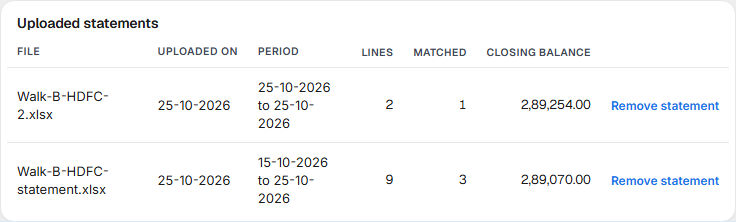
Each statement you uploaded. Remove statement is for a wrong file.
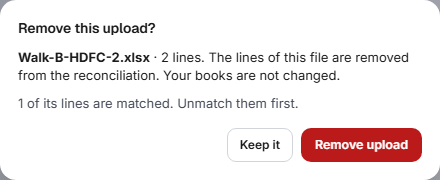
Removing a statement removes only its lines from the reconciliation. Your books are not changed. If some of its lines are matched, unmatch them first.
Printing
Print prints the Bank Reconciliation Statement for your accountant: the six figures, then the vouchers not yet in the bank and the bank lines not yet in your books.
How to reconcile a bank account
- Choose the Bank account and the As on date.
- Select Upload statement, choose the file, check the columns and the balance check, and select Upload and find matches.
- Under Suggested matches, select Confirm on each correct one, or Confirm all. Use Not this on a wrong one. Where several vouchers fit, select Use this on the right one.
- For card and UPI money, select Review, check the fee and its GST, and select Confirm.
- Under In the bank, not in your books, select Make a voucher for each bank charge, interest or payment your books do not have.
- Check In your books, not yet in the bank. Anything still waiting for the bank is normal: a cheque not yet presented. Anything old is worth a call to the bank.
- Stop when the Difference is 0.00. Print the statement for your accountant.
What to do when something needs attention
| You see | What it means | What to do |
|---|---|---|
| Difference is not 0.00 and the sentence under it names lines | Bank lines are not in your books. | Confirm the suggestions and make a voucher for each other line. |
| Difference is not 0.00 and every bank line is in your books | The difference comes from somewhere else. | Check the bank dates and the opening items. |
| Opening + deposits − withdrawals ≠ closing when you upload | The file is missing a line. | Download the statement again, with every line. |
| Already uploaded — skipped on every row | You uploaded this statement before. | Nothing to do. Choose the next statement. |
| No bank statement uploaded | There is no statement for this account. | Select Upload statement. |
| A cheque you gave is not in the statement for weeks | The payee has not banked it, or it is post-dated. | Leave it, or check the cheque in Cheques. |
| You don't have access to Bank Reconciliation | Your login does not include it. | Ask an administrator to give you access. |
Related
- Receipts and Payments: the vouchers you match here.
- Cheques: which cheques have cleared.
- Bank accounts: add a bank, its cheque books and the Reconcile from date.
- Day Summary: where card and UPI sales come from.
- Statements: the Balance Sheet that shows your bank balance.
- Day Book, Ledger and Journals: the bank ledger's balance after every entry.
- Chart of Accounts: where the bank accounts are kept.