GST returns
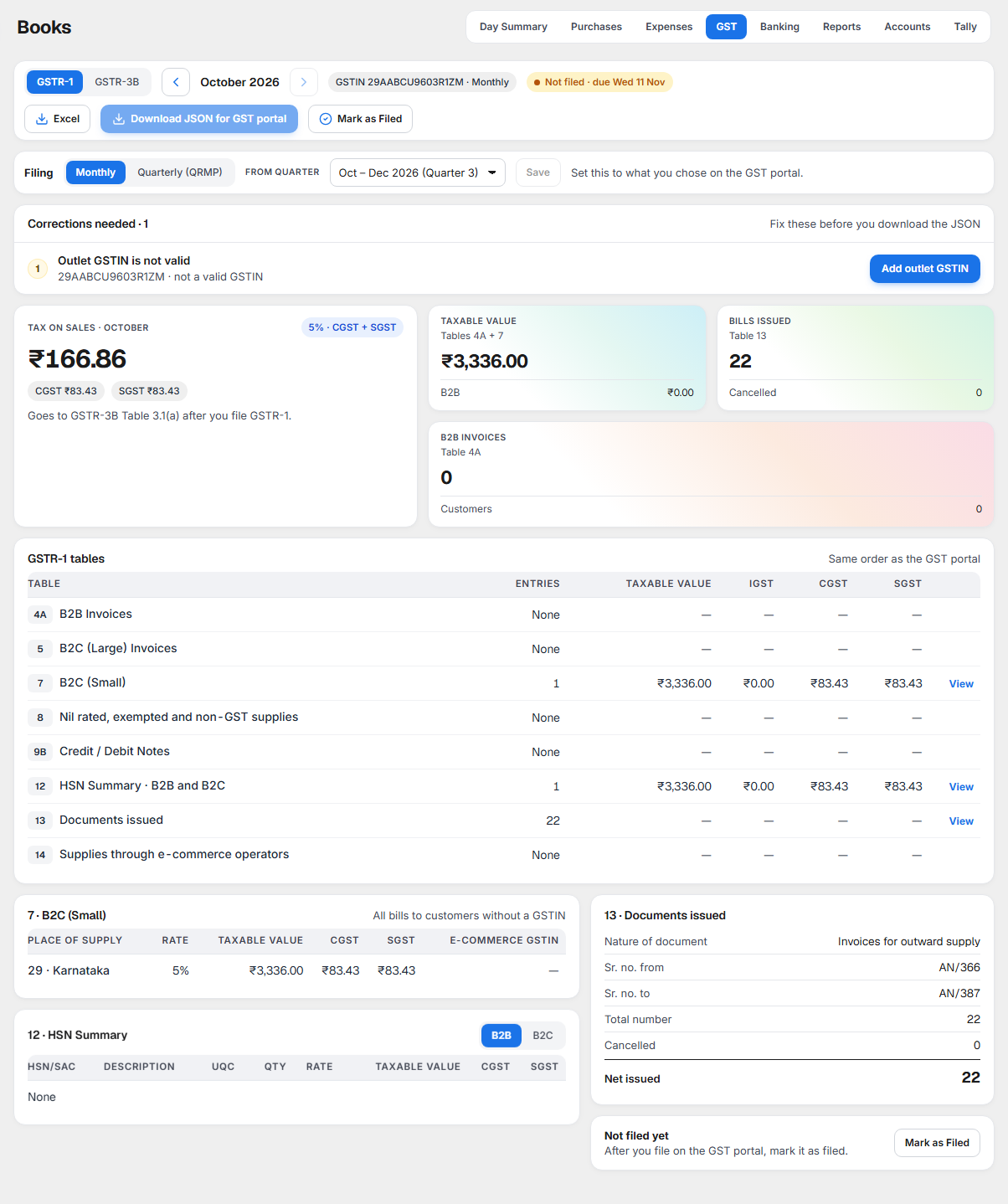
GST answers one question: what do I enter on the GST portal this month? It shows your two monthly returns, laid out in the same tables as the GST portal:
- GSTR-1: your sales, bill by bill for registered customers and in total for everyone else.
- GSTR-3B: the summary return, with the tax on your sales, the input tax credit (ITC) you can claim, and the cash left to pay.
- Corrections needed: anything that would make a return wrong, with the button that fixes it.
- Download JSON for GST portal: the GSTR-1 file you upload on the portal.
- Mark as Filed: a note that you have filed the return, with who and when.
Open it from Books, the GST tab.
Why it matters for filing
Every month you file GSTR-1 first, then GSTR-3B, on the GST portal. The portal fills GSTR-3B from your GSTR-1, so GSTR-1 must be right first.
| Return | What it is | Due (monthly filer) | Where KJB's figures go |
|---|---|---|---|
| GSTR-1 | Your sales of the month | 11th of the next month | The portal's GSTR-1 tables, or the JSON file you upload |
| GSTR-3B | Tax on sales, ITC, and tax to pay | 20th of the next month | GSTR-3B tables 3.1, 3.1.1, 4, 5.1 and 6.1 on the portal |
One return for each GSTIN. You file one GSTR-1 and one GSTR-3B for each GSTIN, not for each outlet. If two or more outlets share a GSTIN, KJB adds them up into one return, and the strip says how many outlets it covers. Your books stay separate for each outlet.
Quarterly filers. If your turnover is up to ₹5 crore, you may have chosen on the GST portal to file quarterly (the QRMP scheme). Then:
| Return | Due (quarterly filer) |
|---|---|
| GSTR-1 for the quarter | 13th of the month after the quarter |
| IFF for months 1 and 2 (optional, B2B bills only) | 13th of the next month |
| Tax for months 1 and 2 (challan PMT-06) | 25th of the next month |
| GSTR-3B for the quarter | 22nd or 24th of the month after the quarter, depending on your state |
Set Filing to the same choice you made on the portal (see Filing: monthly or quarterly).
Filing on time matters. A late return carries a late fee, and tax paid late in cash carries interest.
The rules KJB follows
5% or 18%: who can claim ITC
| Your outlet | GST on your bills | Can you claim ITC on purchases? |
|---|---|---|
| A restaurant, not at specified premises | 5% | No. GST you pay on purchases is part of your cost. |
| A restaurant at specified premises (for example, inside a hotel) | 18% | Yes, as explained below. |
ITC (input tax credit) means the GST you paid on purchases, taken off the GST you owe on sales.
ITC only once it is in GSTR-2B
GSTR-2B is a statement the GST portal makes for you every month. It lists the purchase bills your suppliers have reported. You can claim ITC on a bill only after it appears in your GSTR-2B.
| Purchase bill | What GSTR-3B does |
|---|---|
| Found in this month's GSTR-2B | Its GST is claimed in Table 4(A)(5) All other ITC. |
| Not in GSTR-2B yet | Its GST is on hold. Claim it in the month its supplier reports it. |
| In GSTR-2B, but the supplier marked ITC not available | Not claimable. Shown for information. |
| No GSTR-2B uploaded for the month | No ITC is claimed. GSTR-3B asks you to upload GSTR-2B. |
You upload GSTR-2B in Purchases, under Match GSTR-2B. GSTR-2B for a month is ready on the GST portal on the 14th of the next month.
Expense bills with GST follow the same rule.
IGST credit is used first
When ITC pays your tax (Table 6.1), the law fixes the order:
| Order | Credit | Pays |
|---|---|---|
| 1 | IGST credit | IGST first, then CGST and SGST, split so the least cash is left to pay |
| 2 | CGST credit | CGST, then IGST. Never SGST. |
| 3 | SGST credit | SGST, then IGST. Never CGST. |
Whatever is left after this is Paid in cash. Credit left over is carried forward to next month.
Reverse charge is paid in cash
When you rent a place from a landlord who is not registered for GST, you pay the GST on the rent. This is called reverse charge (RCM). In GSTR-3B:
- the tax goes in Table 3.1(d) Inward supplies (liable to reverse charge);
- it is always paid in cash, never from ITC;
- at an 18% outlet you then claim it back as ITC in Table 4(A)(3). At a 5% outlet it is part of your cost.
Bills unpaid after 180 days (Rule 37)
At an 18% outlet, if you have not paid a supplier within 180 days of the bill date, the ITC on the unpaid part must be reversed. KJB puts it in Table 4(B)(2) Others in the month the 180 days end, once only. Interest may be due on it; check it on the portal.
When you pay that supplier later, the ITC comes back: KJB adds it to Table 4(A)(5) and also shows it in Table 4(D)(1) ITC reclaimed which was reversed under Table 4(B)(2) in earlier tax period, in the month you pay. A part payment brings back the matching part of the ITC.
Goods returned to a supplier (Debit Note)
When you return goods and record a Debit Note, what you owe the supplier comes down at once. At an 18% outlet, the ITC comes down when the supplier's credit note appears in your GSTR-2B, in Table 4(A)(5), the same way the GST portal does it. Until the credit note appears in GSTR-2B, GSTR-3B does not change. If the credit notes are more than that month's ITC, 4(A)(5) shows a minus, as on the portal.
What each part of the screen shows
The return strip

- GSTR-1 / GSTR-3B switches the return.
- The arrows change the month.
- The GSTIN of the outlet, and Monthly: KJB prepares monthly returns.
- The filing status: Not filed · due with the due date, or Filed with the date and who marked it, and Undo.
- Excel downloads every table of the open return, one sheet each.
- Download JSON for GST portal (GSTR-1 only) downloads the file you upload on the portal.
- Mark as Filed records that you have filed this return.
The buttons are shown only to people allowed to work on GST.
Corrections needed

Shown only when something would make the return wrong. Until it is fixed, that bill is left out of GSTR-1 and the JSON download stays off. See What to do when something needs attention.
GSTR-1: tax on sales and three figures
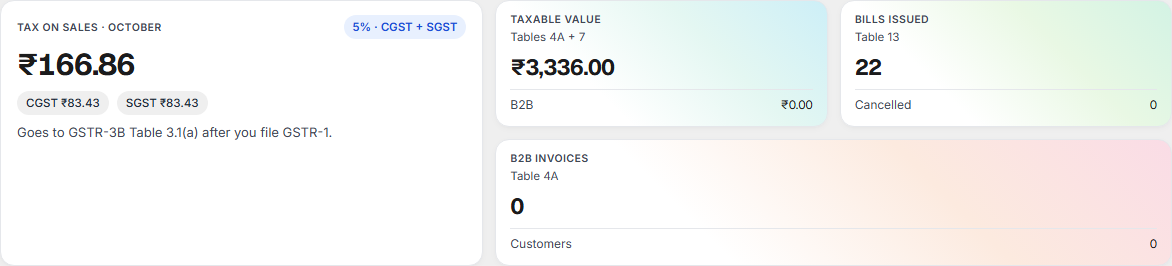
| Card | What it shows |
|---|---|
| Tax on sales | CGST and SGST on your sales this month. It goes to GSTR-3B Table 3.1(a) after you file GSTR-1. |
| Taxable value | Your sales before GST: Table 4A plus Table 7. Below it, the part billed to registered customers (B2B). |
| Bills issued | How many bill numbers were used, with the cancelled ones (Table 13). |
| B2B invoices | Bills to customers with a GSTIN, and how many customers. |
GSTR-1 tables
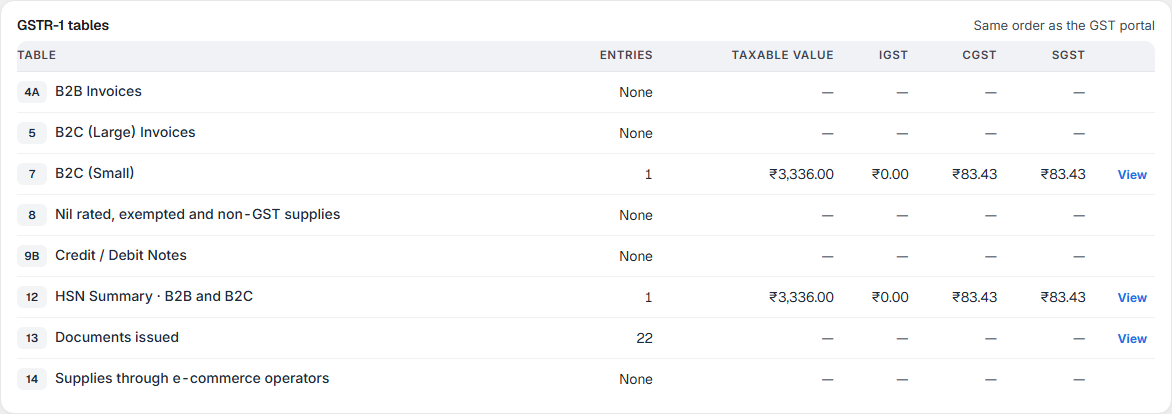
One line for each table of the portal's GSTR-1, in the portal's order. View takes you to the table's detail below. A table with nothing to report says None.
| Table | What goes in it |
|---|---|
| 4A B2B Invoices | Each bill to a customer with a valid GSTIN. |
| 5 B2C (Large) Invoices | Bills to another state above ₹1 lakh. A restaurant's sales are in its own state, so this is normally None. |
| 7 B2C (Small) | All other bills, added up by state and GST rate. |
| 8 Nil rated, exempted and non-GST supplies | Sales without GST. None for a restaurant bill. |
| 9B Credit / Debit Notes | Credit notes to customers. KJB does not issue them, so None. |
| 12 HSN Summary | Your sales by HSN/SAC code, in two tabs, B2B and B2C. |
| 13 Documents issued | Your bill numbers: from, to, how many, and how many cancelled. |
| 14 Supplies through e-commerce operators | Sales through Swiggy or Zomato where they pay the GST. KJB does not take aggregator orders, so None. |
B2B Invoices, B2C (Small) and HSN Summary
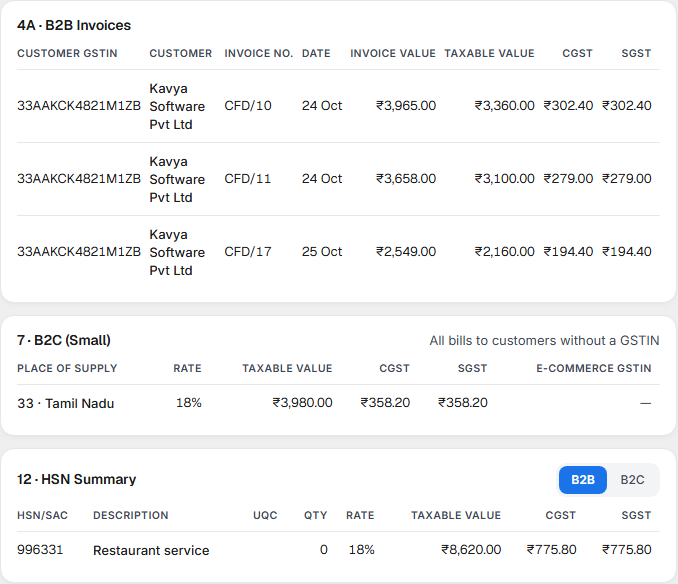
- B2B Invoices: customer GSTIN, customer, bill number, date, invoice value, taxable value, CGST and SGST.
- B2C (Small): one row for each state and rate. Place of supply is the state where the restaurant serves, the first two digits of your GSTIN.
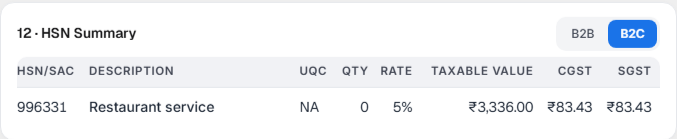
- HSN Summary: a restaurant supplies a service, so every bill is reported under SAC 996331, Restaurant service, not under the HSN codes of the dishes. Switch between B2B and B2C.
Documents issued
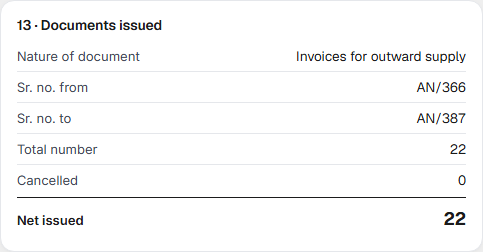
One block for each bill series: Sr. no. from, Sr. no. to, Total number, Cancelled and Net issued. A cancelled bill keeps its number; it is counted here and left out of every amount. Complimentary (no-charge) bills have their own series.
Filing: monthly or quarterly
Under the return strip, Filing shows Monthly or Quarterly (QRMP). To change it, choose the other one, pick the quarter it starts from in From quarter, and select Save. Choose what you chose on the GST portal. For a quarterly GSTIN the month arrows change to quarters, for example Jul – Sep 2026 (Quarter 2).
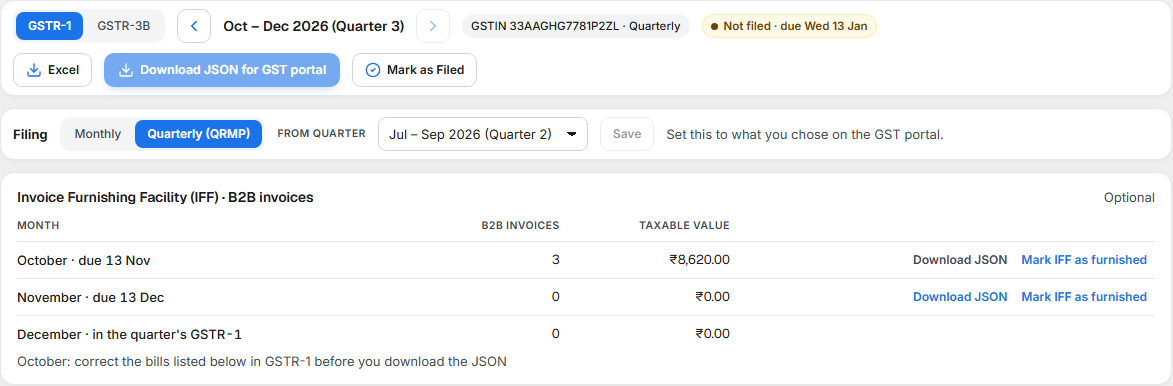
Invoice Furnishing Facility (IFF). On a quarterly GSTR-1, this card lists the B2B bills of months 1 and 2. Sending them early through IFF is optional; it lets your registered customers claim their ITC sooner. For each month, Download JSON gives the file to upload, and Mark IFF as furnished records that you uploaded it. Bills furnished in IFF are left out of the quarter's GSTR-1. A bill you add or change after marking IFF as furnished is listed so you can report or amend it on the portal.
GSTR-3B
Select GSTR-3B in the return strip.
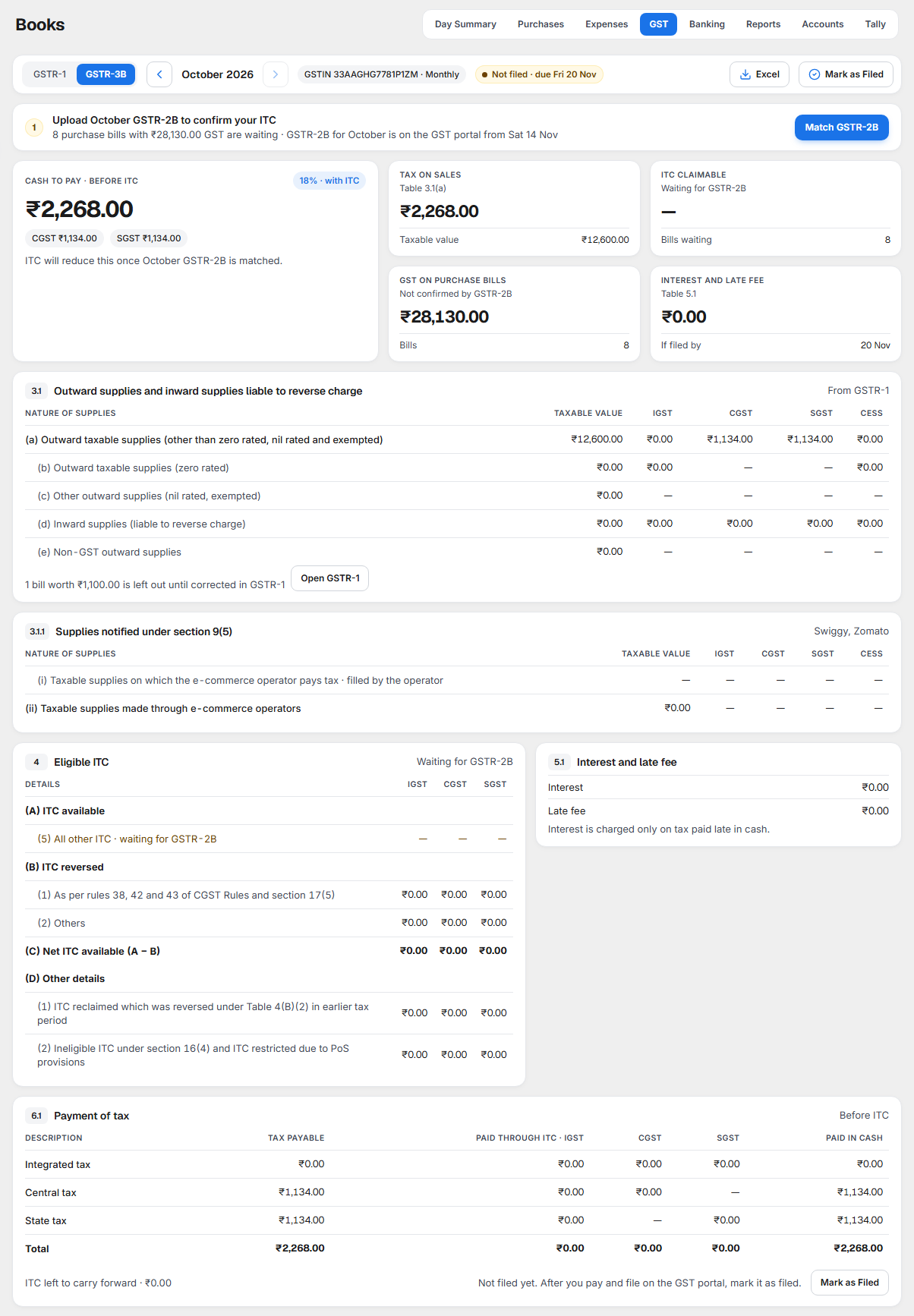
At the top, Cash to pay is the tax left to pay in cash after ITC, with CGST and SGST (and IGST when there is any). Four cards follow. At an 18% outlet: Tax on sales, ITC claimable, ITC on hold and Interest and late fee. At a 5% outlet: Tax on sales, Swiggy and Zomato, GST on purchases (not claimable at 5%) and Interest and late fee.
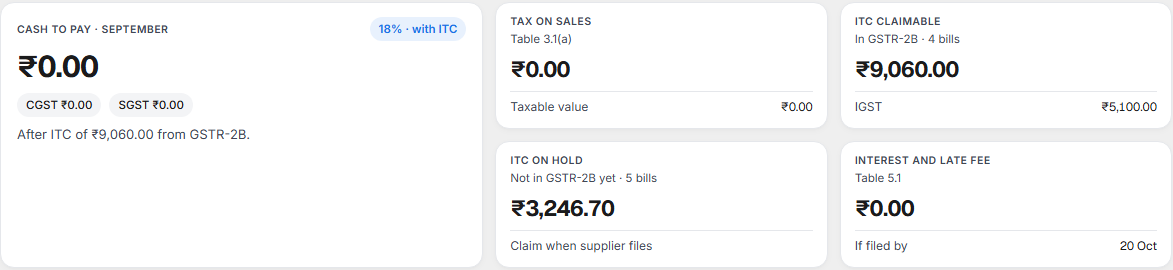
Then the portal's tables:
| Table on screen | What it shows |
|---|---|
| 3.1 Outward supplies and inward supplies liable to reverse charge | (a) your sales from GSTR-1; (d) reverse charge on rent; (b), (c), (e) are zero for a restaurant. If bills are left out of GSTR-1 for a correction, a line says how many and their value, with Open GSTR-1. |
| 3.1.1 Supplies notified under section 9(5) | (ii) sales through an e-commerce operator who pays the GST: value only. |
| 4 Eligible ITC (18% outlets) | (A) ITC available: (3) reverse charge, (5) all other ITC from GSTR-2B. (B) ITC reversed: (2) others, for Rule 37. (C) Net ITC available, A − B. (D) other details. |
| ITC on hold | Each purchase or expense bill waiting for GSTR-2B, with the reason: Not in GSTR-2B yet, Amount differs (with both amounts), or Not claimable (supplier marked ITC not available). |
| 5.1 Interest and late fee | Interest and late fee. |
| 6.1 Payment of tax | For each tax: tax payable, paid through ITC (IGST, CGST, SGST credit) and paid in cash, with the total. Below it, ITC left to carry forward. |
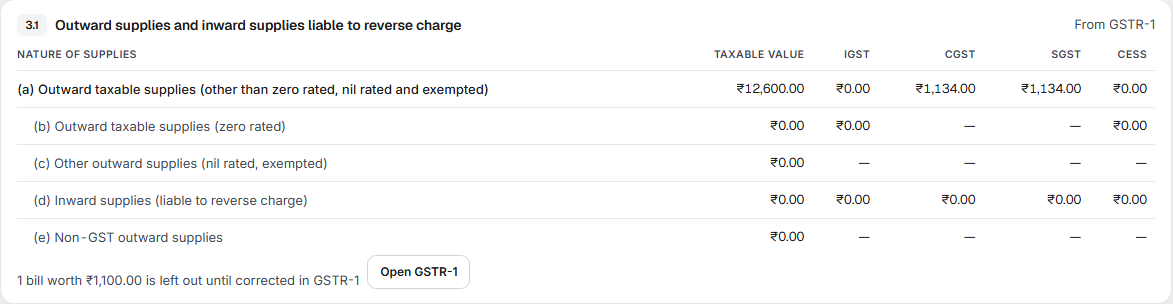
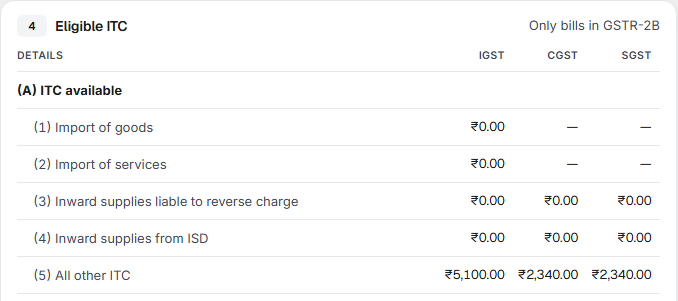
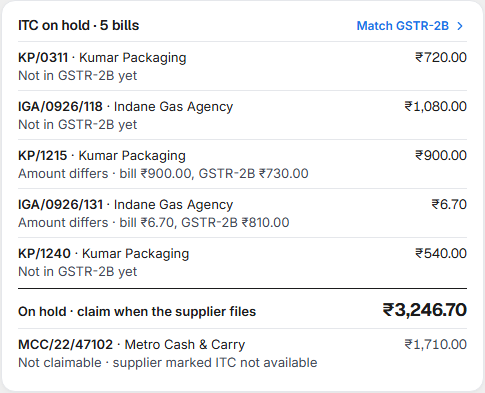
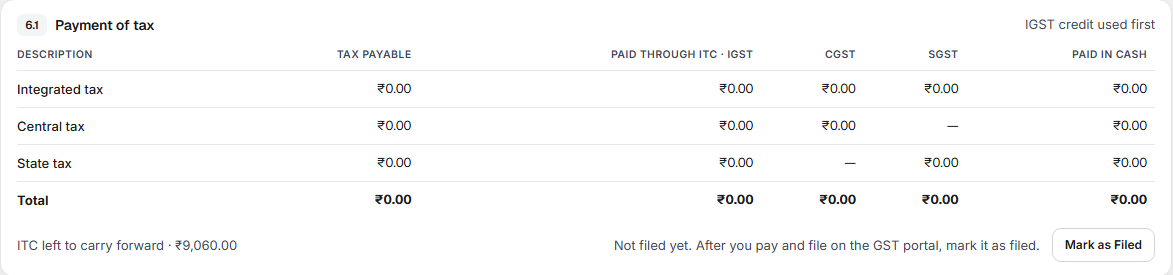
At a 5% outlet, Table 4 shows No ITC at 5% restaurant rate and the GST paid on purchases, which is part of your cost.
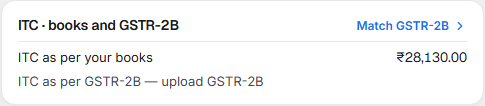
ITC · books and GSTR-2B. At an 18% outlet this card shows the ITC on all your purchase and expense bills of the month (ITC as per your books), the ITC your suppliers have reported (ITC as per GSTR-2B) and the difference, which is on hold until they file. Match GSTR-2B › opens the bill-by-bill list.
Tax to pay each month (PMT-06). On a quarterly GSTR-3B, this card shows the tax to pay for months 1 and 2: that month's tax less that month's ITC. Pay it by the 25th of the next month and select Record payment. Month 3 is paid with the quarter's GSTR-3B; its cash to pay is what is left after the PMT-06 payments.


What to do when something needs attention
Corrections needed
| The line says | What it means | What to do |
|---|---|---|
| Bill … customer GSTIN is not valid | The customer's GSTIN is wrong, so the bill cannot go in B2B. It is left out of GSTR-1 until fixed. | Select Correct customer GSTIN, find the customer and correct the GSTIN. |
| Outlet GSTIN is missing or not valid | The outlet has no GSTIN, or a wrong one. A return cannot be filed without it. | Select Add outlet GSTIN and enter it in Setup ▸ Outlets. |
A GSTIN has 15 characters and ends in a check letter or digit; KJB checks both.
Upload GSTR-2B to confirm your ITC

At an 18% outlet, before you upload the month's GSTR-2B, GSTR-3B claims no ITC and shows the tax before ITC.
- Download GSTR-2B for the month from the GST portal (JSON), on or after the 14th of the next month.
- Select Match GSTR-2B. It opens Purchases; select Match GSTR-2B there and upload the file.
- Come back to GST ▸ GSTR-3B. ITC claimable, ITC on hold and the cash to pay are now worked out.
Download the JSON and file GSTR-1
- Clear every line under Corrections needed. The download stays off until then.
- Select Download JSON for GST portal. The file is named
GSTR1_<GSTIN>_<MMYYYY>.json. - On the GST portal, open GSTR-1 for the month, choose to prepare offline, and upload the file.
- Check the summary on the portal, then file with EVC or DSC.
Record GST payment
After you pay the tax on the GST portal with a challan, record it so your books show the GST as paid.

- On GSTR-3B, select Record GST payment.
- Check the amounts. They come from Table 6.1 (tax paid in cash, by Central, State and Integrated tax, and reverse charge). Enter Interest and Late fee if the portal charged any.
- Enter Paid on, Paid from (the bank or cash account), the CPIN (14 digits, on the challan), the CIN (17 characters, from the bank) and the BRN / UTR if you have it.
- Select Record payment.
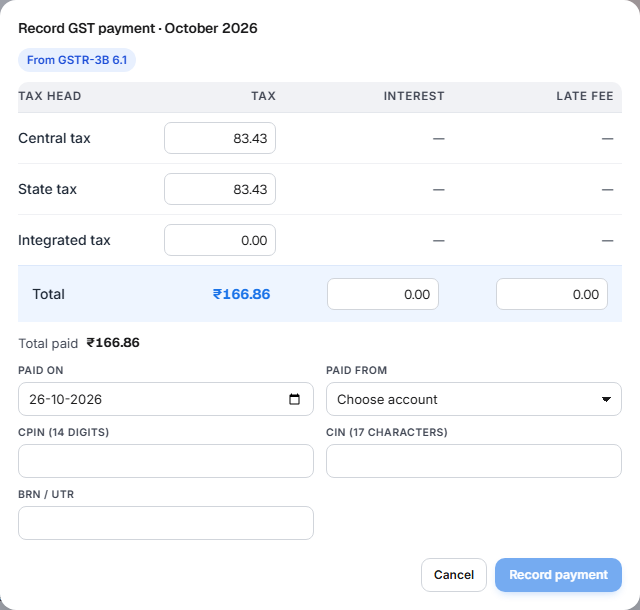
KJB records two entries in your books: a journal that uses your ITC against the tax (as in Table 6.1), and a payment from the bank for the cash part. The strip then shows GST paid with the date and the CPIN. If you recorded it by mistake, select Cancel payment; both entries are reversed. The bank's reference number helps match the payment in bank reconciliation.
Mark as Filed
After you file a return on the portal, select Mark as Filed. The status becomes Filed with the date and your name. Mark as Filed does not file anything on the portal; it is your record.

If you marked it by mistake, select Undo next to the status.
If something goes wrong
A figure looks wrong. Check the outlet and the month first. In GSTR-1, select View and check the bills. In GSTR-3B, check ITC on hold and whether GSTR-2B is uploaded.
Net ITC shows a minus. Supplier credit notes and reversals are more than the ITC available this month. Check this on the GST portal before you file.
"This GSTIN has outlets you cannot see." The return covers outlets you do not have access to, so it is incomplete for you. Mark as Filed and the JSON download are hidden. Ask the owner to file it.
Related
- Day Summary — each day's sales, the figures GSTR-1 adds up.
- Day Book, Journal and Ledger — the entries behind your GST ledgers.
- Chart of Accounts — the GST ledgers in your accounts.