Edit Log
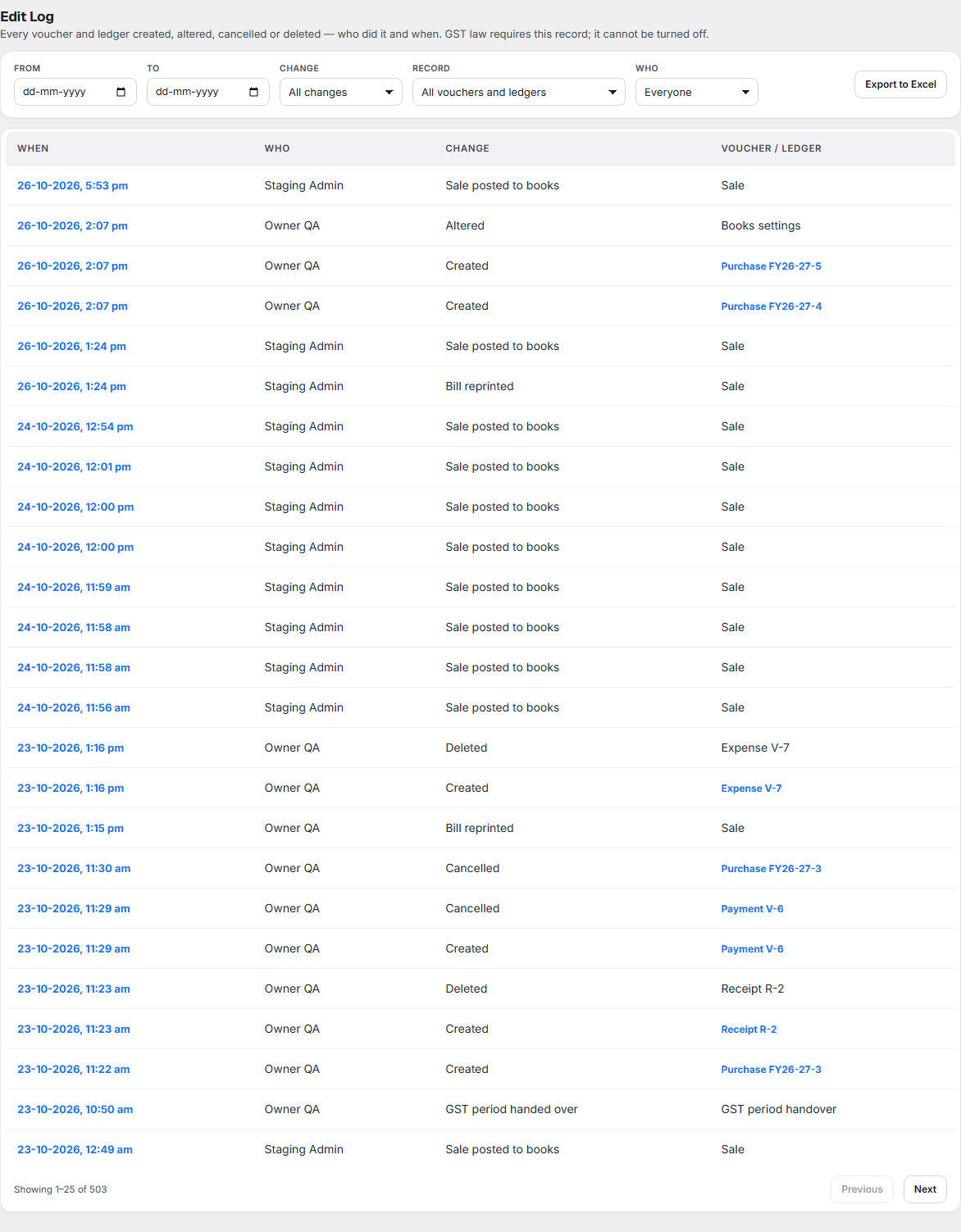
Edit Log answers "who entered or changed this, and when?" It shows:
- every voucher and ledger that was Created, Altered, Cancelled or Deleted,
- who did it and when,
- for a change, the value before and after.
Open it from Books ▸ Accounts ▸ Edit Log.
Why it matters for filing
GST law requires this record. CGST Rule 56(8) says entries in your accounts must not be erased or overwritten, and that for accounts kept on a computer, a log of every entry edited or deleted must be kept. That is why the Edit Log cannot be turned off and nothing in it can be changed.
If a GST officer or your accountant asks why a figure changed, the Edit Log shows who changed it, when, and what it was before. Keep your accounts for at least 72 months after the annual return for the year is due (CGST Act, section 36).
What each part of the screen shows
Filters
| Filter | What it does |
|---|---|
| From and To | The days the change was made. |
| Change | Created, Altered, Cancelled or Deleted. |
| Record | The kind of voucher or master: Journal, Purchase, Payment / expense / other voucher, Receipt, Ledger, Group, Year Close date. |
| Who | The person who made the change. |
The list
| Column | What it shows |
|---|---|
| When | Date and time of the change. |
| Who | The person signed in when it was made. |
| Change | What happened: Created, Altered, Cancelled or Deleted. |
| Voucher / Ledger | Which voucher or ledger, for example Expense V-13. Click it to open it. |
Use Previous and Next to page through. Click a row to open its detail: who and when, and a Before / After table for each field that changed (amount, date, narration, ledger).
From a voucher in the Day Book or a journal, Edit Log opens this screen for that one voucher. Show all changes goes back to the full list.
Export to Excel
Export to Excel downloads every change that matches the filters, for your accountant or an officer.
Cancel and Delete
| Cancel | Delete | |
|---|---|---|
| In the Day Book and lists | Stays, marked Cancelled, at zero | Gone |
| Voucher number | Kept | Not reused |
| In the Edit Log | Yes, with who and when | Yes, with who, when and what it was |
Either way, the record is kept here, as the law requires.
What to do when something needs attention
| You see | What to do |
|---|---|
| A change you do not recognise | Open the row to see before and after, then ask the person named in Who. |
| A voucher was deleted by mistake | Enter it again. The Edit Log keeps what it was, so you can copy the details. |
| Your accountant asks for the changes in a month | Set From and To, then Export to Excel. |
| You need to know who moved the Year Close date | Set Record to Year Close date. |