Receive stock
Quick answer
Manage ▸ Stock ▸ GRN ▸ new ▸ supplier, their invoice number and date ▸ a line per item received ▸ save.
What you'll accomplish
What actually arrived is recorded against what the supplier billed for — and the purchase reaches the books at the same time.
Who can do this
Storekeepers, managers and administrators.
Before you begin
Have the supplier's delivery note or invoice in front of you. You are recording what arrived, and the reference lets someone match it later.
Check the goods before you record them. A GRN saying five crates arrived when four did is worse than no GRN — it becomes the figure everything downstream trusts.
Steps
- Open the GRN workspace and start a new one.
- Choose the supplier, and enter their invoice number and date.
- Record whether it was cash or credit — cash meaning paid on delivery, credit meaning it goes on the account and is owed.
- Add a line for each item received, with quantity and price. At least one line is required.
- Save.
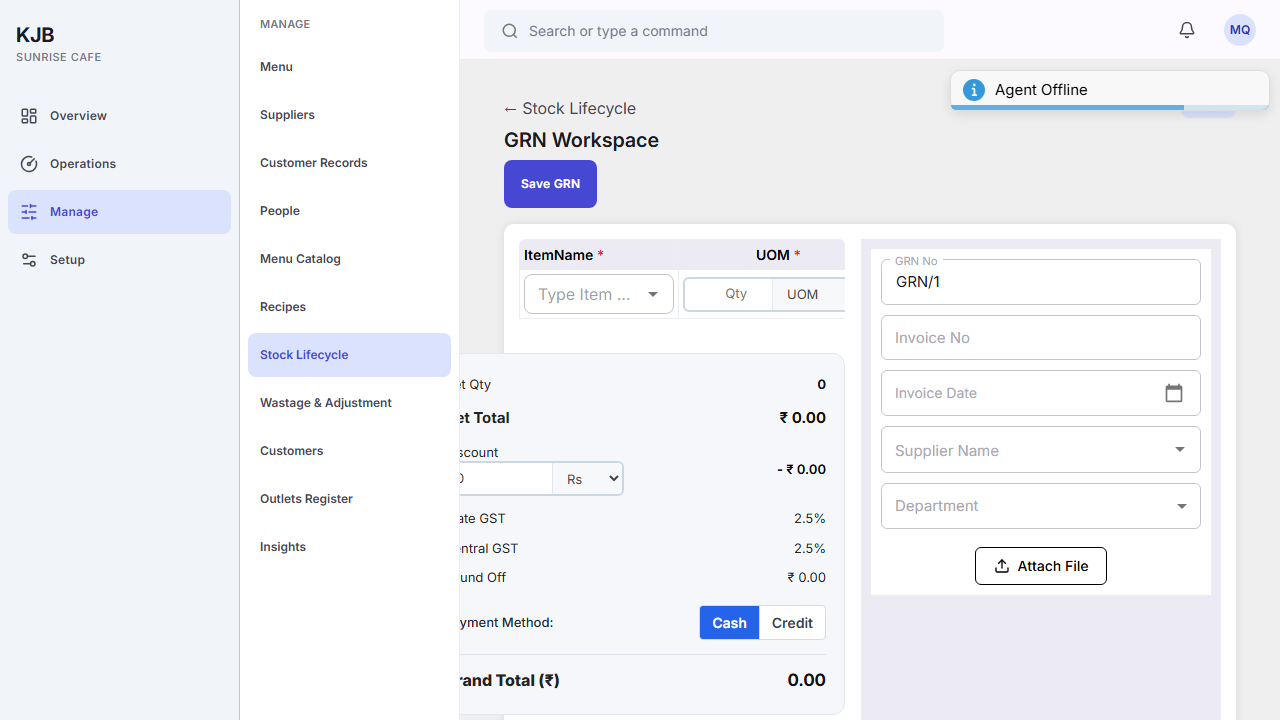
Expected result: the receipt is recorded, stock rises by what arrived, and a purchase appears in the books.
Things to know
A GRN is two records at once. It is a stock movement and a purchase. That is why a purchase bill created from one cannot be overtyped in the accounts — correcting it means correcting the GRN. See Purchases and accounts payable.
Record what arrived, not what was ordered. Where they differ, the delivery is what happened, and the difference is the conversation to have with the supplier.
A GRN can be cancelled, which is the deliberate route for one entered in error rather than editing it into something else.
If something goes wrong
The supplier or the item is not in the list. Both come from lists maintained elsewhere. If what you received is not there, it has to be added before it can be recorded.
You saved a GRN with the wrong figures. Cancel it rather than working around it — the accounting entry follows this record, and the two need to keep agreeing.