Day Summary
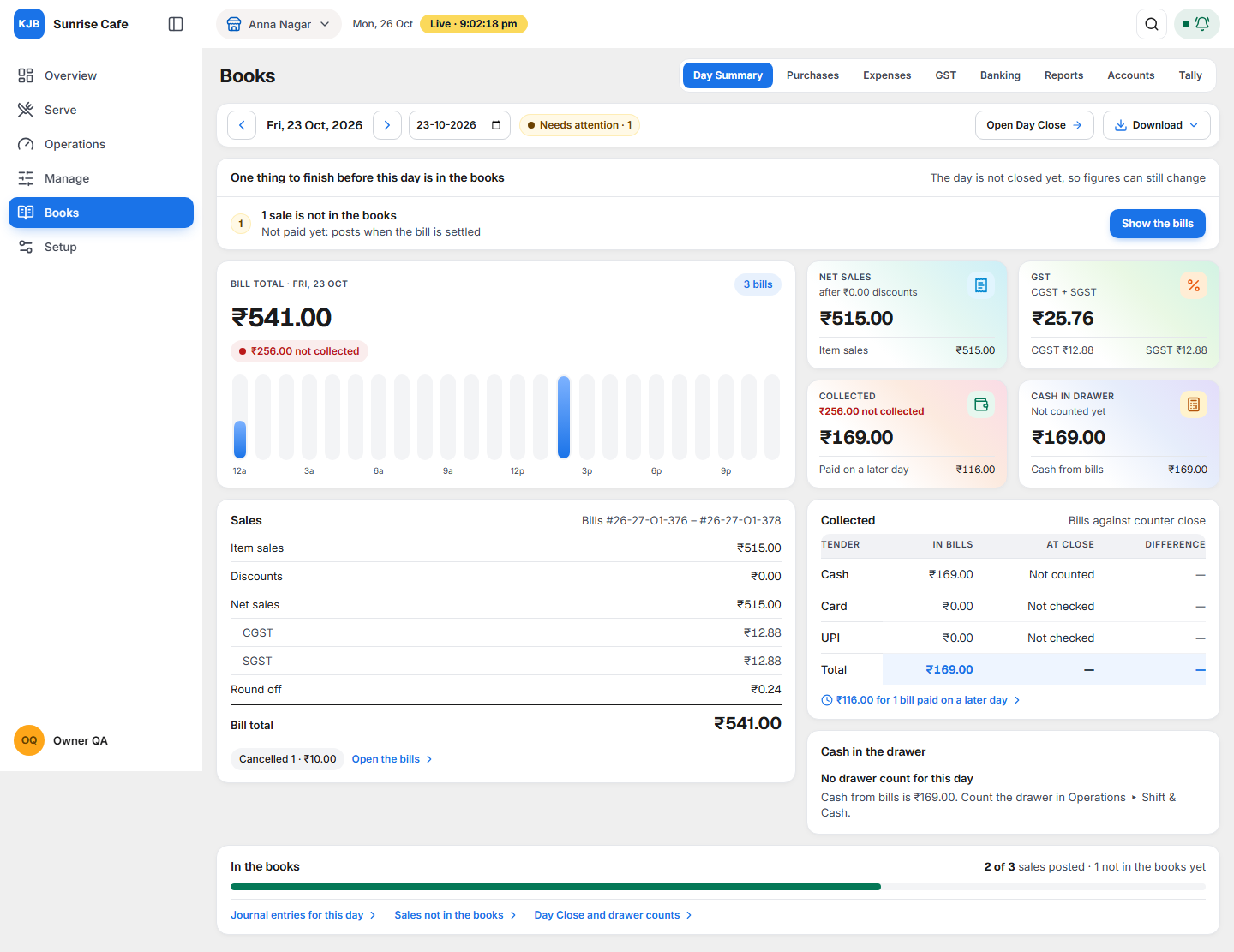
Day Summary shows one day of your business on one screen:
- how much you sold,
- how much money you received (cash, card, UPI),
- whether the cash in your drawer is correct,
- whether every sale is recorded in your accounts.
If something does not match, it tells you what to fix. Open it from Books, first tab.
Two words on this screen need a note:
- In the books is the card at the bottom of the screen. It shows how many of the day's sales are recorded in your accounts. When it says 2 of 3 sales posted, posted means recorded in your accounts: 2 sales are recorded and 1 is not yet.
- In the Cash in the drawer card, a short or over amount marked posted has been recorded in your accounts.
Why it matters for filing
Day Summary is a daily check. It is not a GST return. It shows CGST and SGST only because they are part of every bill.
Your GST returns (GSTR-1, GSTR-3B) and your income tax return are made from your accounts. If a sale is missing from your accounts, those returns will be wrong. Day Summary shows this every day, so you can fix it early instead of at the end of the month.
Open it every evening, or the next morning for yesterday. The owner, the accountant and the administrator can use it.
What each part of the screen shows
Select Books, then the Day Summary tab. It opens on today. Use Previous day and Next day to change the day. The screen shows one outlet, the one named at the top.
The day strip

The date, the status of the day (Complete, Needs attention or Day still open), Open Day Close and Download. Once the day is closed, Open Day Close is replaced by Day closed, with who closed it and when. A day with no bills shows No bills yet.
Things to finish

A card at the top, only when something is left. Each line has a title, a detail and one button. See What to do when something needs attention.
Bill total and four figures
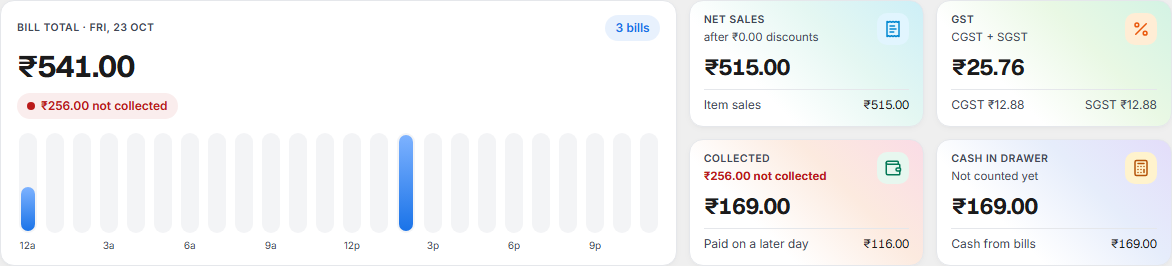
Bill total is what all the day's bills add up to, with the number of bills. The note below it is green when collections match the bills, and red with the amount when they do not. The bars show sales for each hour, from 8 am to 11 pm at least (12a is midnight, 12p is noon). Point at a bar to see its amount.
| Card | What it shows |
|---|---|
| Net sales | Sales after discounts, before GST. |
| GST | CGST and SGST together, each shown below. |
| Collected | What was received against this day's bills, and what was not collected or was paid on a later day. |
| Cash in drawer | Cash counted, with cash expected below. If the drawer is not counted, it shows the cash from bills and says Not counted yet. |
Sales
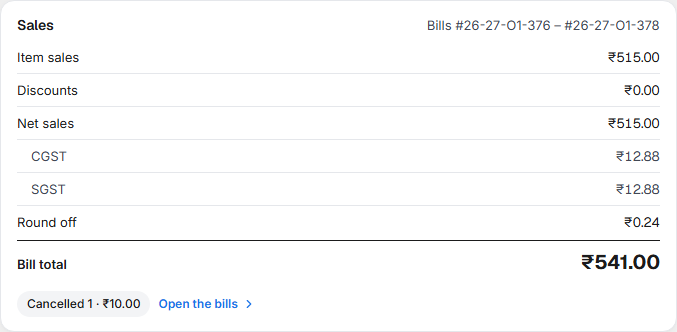
From Item sales to Bill total, line by line: Discounts (shown as a minus, before tax), Service charge, Parcel charge and Delivery charge (only when there is one), Net sales, CGST, SGST and Round off. On the screenshot: ₹515.00 + ₹12.88 + ₹12.88 + ₹0.24 = ₹541.00.
The first and last bill number of the day sit at the top right. Cancelled and Complimentary bills are noted below with count and amount. They are not part of the lines above. Open the bills lists all the day's bills.
Collected
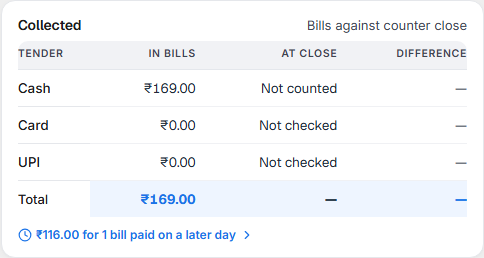
One row each for Cash, Card and UPI. In bills is what the bills recorded. At close is what the counter declared when it closed, or Not counted / Not checked if nothing was declared. Difference is at close less in bills, so a shortage shows as a minus in red. Select Cash, Card or UPI to see its bills. Notes below the table count bills paid on a later day, bills from an earlier day paid today, and card or UPI bills without a transaction reference.
Cash in the drawer
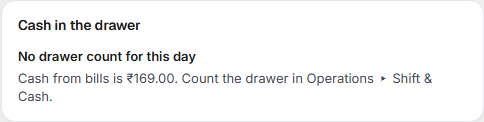
This card checks whether the cash in the drawer is correct. When staff have counted the drawer, the card works out how much cash should be there, line by line:
| Line on the card | What it means |
|---|---|
| Opening float | Cash kept in the drawer at the start of the day. |
| + Cash sales | Cash received for the day's bills. |
| + Paid in | Cash put into the drawer for any other reason. Shown only when there is some. |
| − Paid out | Cash paid from the drawer, for example to buy vegetables. Shown only when there is some. |
| − Taken out (safe drops, deposits) | Cash removed from the drawer, for example moved to the safe or taken to the bank. Shown only when there is some. |
| Expected in drawer | What should be in the drawer: the lines above added up. |
| Counted | What staff actually counted. |
| Short or Over | Counted is less than expected (short) or more (over). When they are equal, the line reads ₹0.00 · matches. |
When a short or over amount has been recorded in your accounts, it also shows the word posted. To record it, use the line under Things to finish. If the outlet has more than one drawer, each drawer has its own block.
If the drawer was not counted, the card says No drawer count for this day. Count the drawer in Operations ▸ Shift & Cash.
In the books

How many of the day's sales are recorded in your accounts, with a bar, for example 2 of 3 sales posted. Three links: Journal entries for this day opens the Day Book; Sales not in the books lists the bills not yet recorded (shown only when there are some); Day Close and drawer counts opens Close the day.
Download

Choose the day, then select Download. Take PDF for the accountant to read or print, or Excel for the accountant to work on in a sheet. Both carry the figures of the day on screen. A message tells you when the file is ready, or that it could not be made and to try again.
What to do when something needs attention
What the status means
| Status | What it means | What to do |
|---|---|---|
| Complete | The day is closed, every sale is recorded in your accounts, and any cash short or over is recorded too. | Nothing. |
| Needs attention | Something is left to finish. The number is how many things are listed. | Work through the list at the top. |
| Day still open | Nothing is left to finish, but the day is not closed in Day Close, so figures can still change. | Select Open Day Close when the day is over. |
Needs attention comes first. A day that is not closed and also has something to finish shows Needs attention, not Day still open.
Each thing to finish
| The line says | What it means | What to do |
|---|---|---|
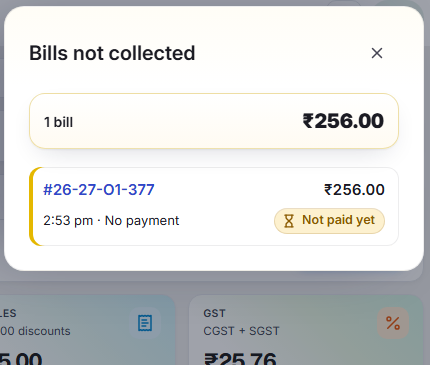
| N sales are not in the books, reason Not paid yet: posts when the bill is settled | A bill is recorded in your accounts only when it is paid. | Select Show the bills. Collect payment and settle the bill in the POS. |
| N sales are not in the books, any other reason, such as a ledger that is not linked | These sales cannot be recorded until the reason is fixed. | Select Fix in Chart of Accounts, which opens Chart of Accounts. Shown only to people allowed to record in the accounts. |
| N sales are still waiting to go into the books | The day is closed and these sales will be recorded in a few minutes. | Wait a few minutes. Show the bills lists them. |
| Cash short ₹X is not in the books (or over) | The cash counted did not match the cash expected, and the difference is not yet recorded in your accounts. The line names the drawer. | Select Post short to books (or Post over to books), check the amount, then Post to books. It is recorded once and cannot be recorded twice. Cancel leaves it. Shown only to people allowed to record in the accounts. |
| Card at close differs from the bills by ₹X (or UPI) | The amount declared at close is not the amount in the bills. | Select Show the bills and check them against the card machine or UPI statement. |
Show the bills opens a list on the right, with each bill's number, amount, time, how it was paid and a tag such as Not paid yet. The total at the top of the list equals the figure that opened it. A bill recorded as credit is not recorded in your accounts on purpose. It is shown as a note, not as a thing to finish.
If something goes wrong
The screen could not load a day. It keeps showing the last day that loaded and says so in a red note. Select Try again.
A figure looks wrong. Check the date first. Then open the bills behind the figure. The list always adds up to it.
Related
- Day Book, Journal and Ledger — the account entries behind In the books.
- Close the day — closing the day in Operations.
- Chart of Accounts — where you fix a sale that cannot be recorded.
- Count and close a drawer — the count that fills Cash in the drawer.