Record wastage
Quick answer
Manage ▸ Stock Lifecycle ▸ Wastage & Adjustment ▸ add a line per item ▸ pick a reason ▸ submit.
What you'll accomplish
Stock that was spoiled, spilt or broken leaves your figures with an explanation attached, instead of quietly going missing.
When to use this
Something got thrown away. A crate came in damaged. A dish was dropped. Anything that reduces stock without being sold.
Steps
-
Open Manage ▸ Stock Lifecycle ▸ Wastage & Adjustment.
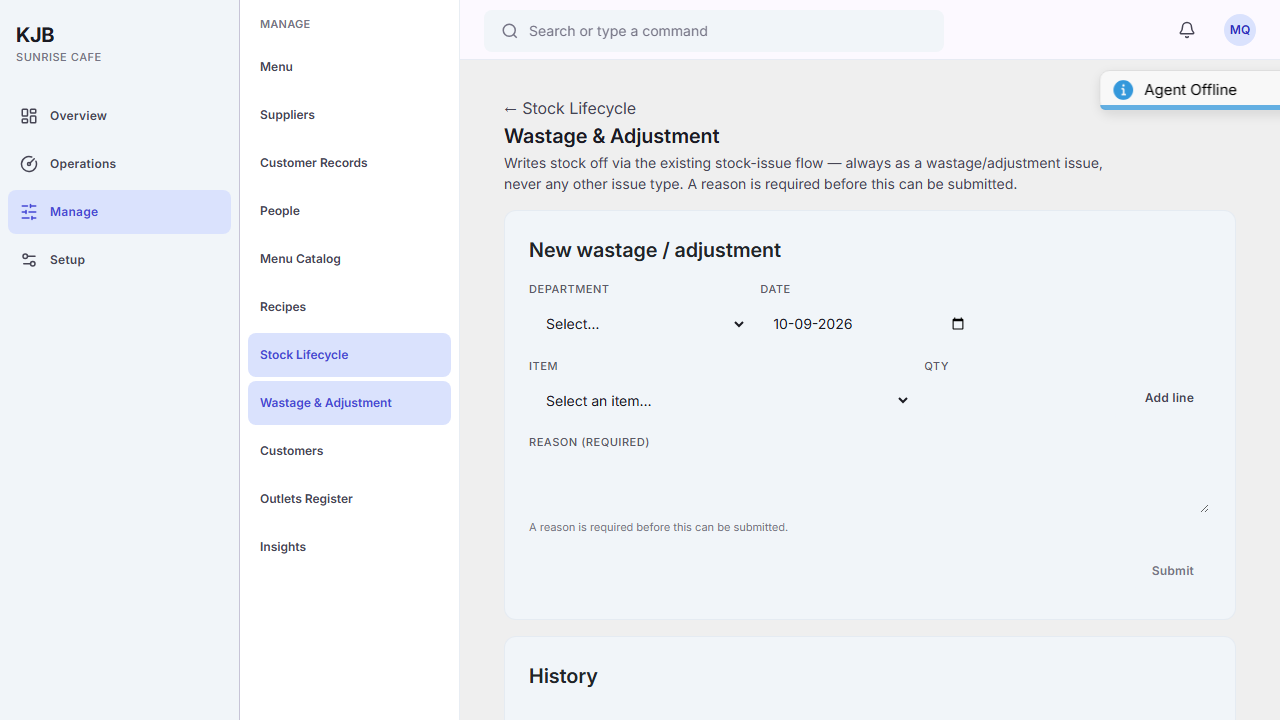 2. Choose the Department and the Date the loss happened on — not the date you are
entering it.
3. Pick the Item, enter the Qty lost, and select Add line. Repeat for each
item.
4. Enter a reason. The field is labelled Reason (required), and the screen says so plainly:
a reason is required before this can be submitted.
5. Select Submit.
2. Choose the Department and the Date the loss happened on — not the date you are
entering it.
3. Pick the Item, enter the Qty lost, and select Add line. Repeat for each
item.
4. Enter a reason. The field is labelled Reason (required), and the screen says so plainly:
a reason is required before this can be submitted.
5. Select Submit.
Expected result: stock falls by what was recorded, and the entry appears in the History below the form, with its reason.
Why the reason is required
A stock figure that drops with no explanation is indistinguishable from theft, from a mis-keyed delivery, and from an error. The reason is what separates them later, and it is the difference between a number that tells you something and a number that only worries you.
It is also what makes wastage readable in aggregate — see Insights, where it appears as revenue leakage by type.
Record it when it happens
Wastage remembered at the end of the week is wastage estimated. The value of the record comes from it being contemporaneous, and a stock count that disagrees with the books is much easier to explain when the wastage entries are honest and timely.
Things to know
An entry can be cancelled if it was recorded in error.
The history is the point, not the entry. One breakage tells you nothing. The same reason appearing every week tells you where to look.
Related
- How stock works in KJB
- Count stock — where unrecorded wastage shows up as an unexplained difference
- Reason codes — where the list of reasons comes from