Day Book, Ledger and Journals
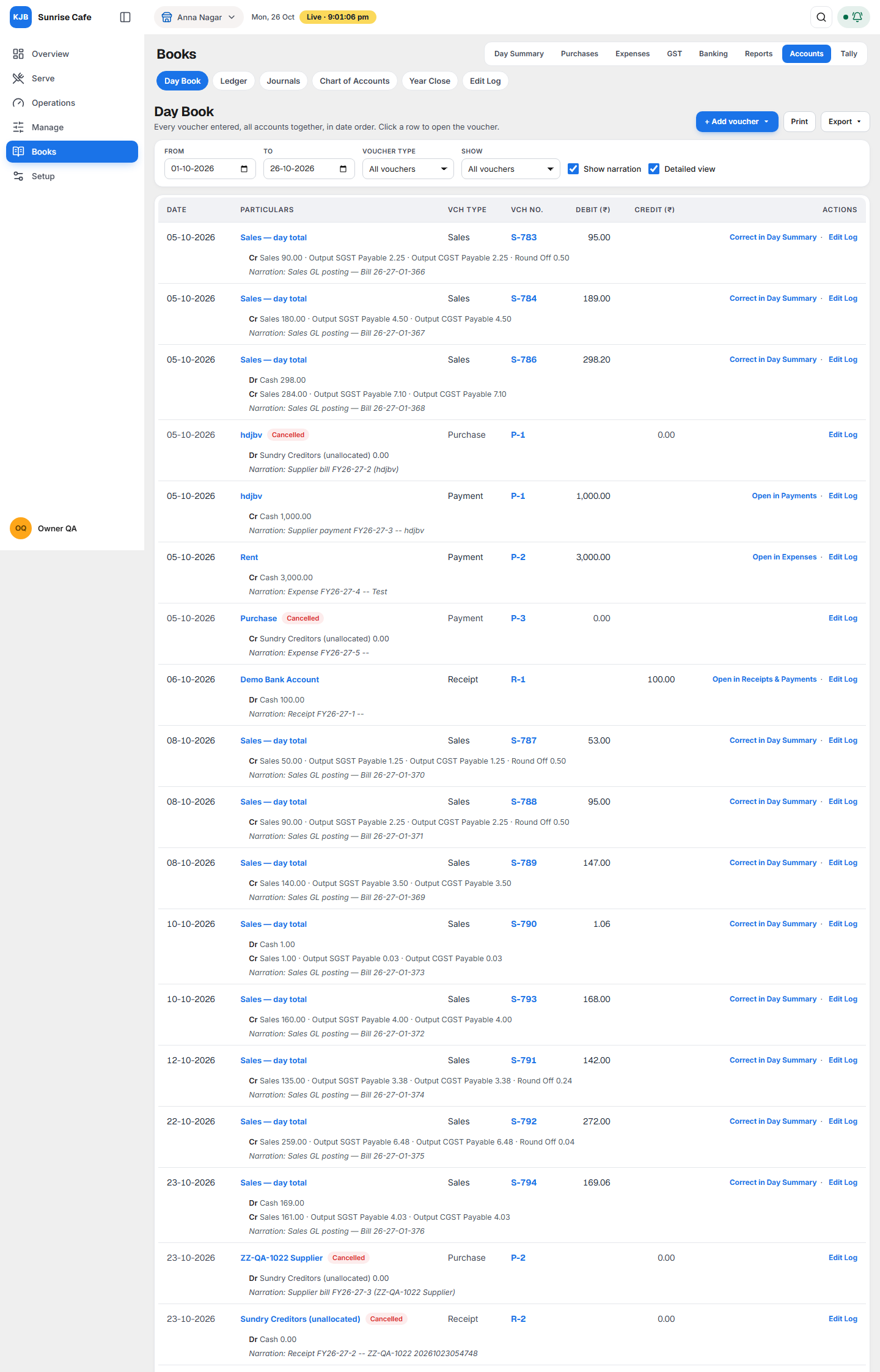
These three screens show every entry in your accounts:
- Day Book: every voucher, for all accounts, in date order.
- Ledger: the story of one account, with its balance after every entry.
- Journals: entries you make by hand, such as depreciation or moving an amount to the right account.
Open them from Books ▸ Accounts. They are the first three tabs.
A voucher is one entry: a sale, a purchase bill, a payment, a receipt, a contra (cash to bank or bank to cash) or a journal. Every voucher has a Dr (debit) side and a Cr (credit) side, and the two sides are always equal.
Why it matters for filing
Your income tax return (ITR) is filed from your Profit & Loss and Balance Sheet. Your GST returns use your sales, your purchases and the GST on them. All of these are added up from the vouchers on these screens.
- Day Book is where you check that nothing is missing or entered twice before you file.
- Ledger is where you check one figure. "How much do I owe Kumar Packaging?" "Is my cash correct?" "What did I spend on electricity this year?"
- Journals is where you make the adjustments your accountant asks for at the year end, such as depreciation. Without them, the profit in your ITR is wrong.
Day Book and Ledger: what is the difference?
| Day Book | Ledger | |
|---|---|---|
| Question it answers | "What was entered on these days?" | "What happened in this one account, and what is its balance?" |
| What it lists | Every voucher, all accounts | Only vouchers that touch the account you choose |
| Balance | None | Opening balance, balance after each line, closing balance |
Example. You pay Kumar Packaging ₹5,000 in cash:
- the Day Book shows one line: Payment, ₹5,000;
- the Kumar Packaging ledger shows ₹5,000 in Debit, and what you owe goes down by ₹5,000;
- the Cash ledger shows ₹5,000 in Credit, and your cash goes down by ₹5,000.
The same voucher shows once in the Day Book and once in the ledger of each account it touches.
Day Book
Choosing what to see

| Control | What it does |
|---|---|
| From and To | The days to show. |
| Voucher type | Sales, Purchase, Payment, Receipt, Contra, Journal or Debit Note. |
| Show | All vouchers, only Altered vouchers (changed after they were entered), only those not altered, or Cancelled vouchers. |
| Show narration | Shows the note written on each voucher. |
| Detailed view | Shows each Dr and Cr line of the voucher, with the amount. |
The list
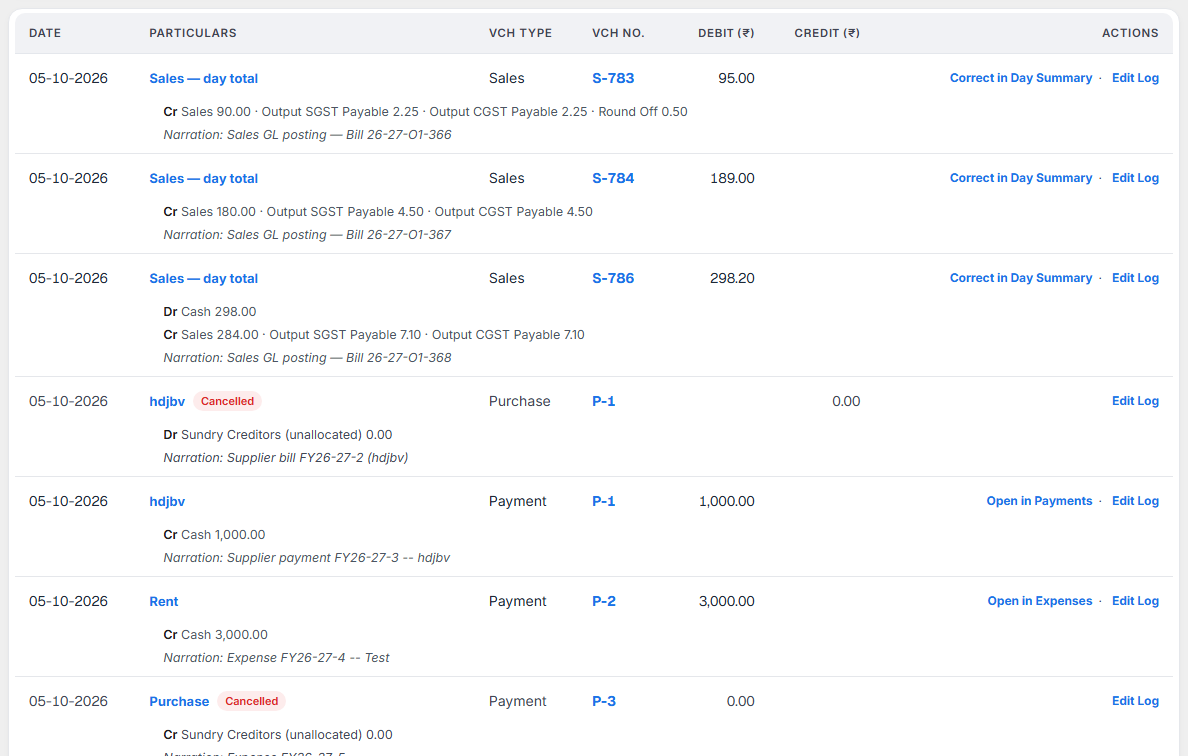
Each row shows Date, Particulars (the main account), Vch Type, Vch No., Debit (₹) and Credit (₹). When a voucher has more than one account on one side, Particulars reads Rent and 2 more. Total for the period is at the bottom.
Two marks can appear next to Particulars:
- Altered: the voucher was changed after it was entered. The Edit Log shows what changed.
- Cancelled: the voucher was cancelled. It stays in the list with amount 0.00.
Click a row to open the voucher.
Actions on each row
| Action | Shown for | What it does |
|---|---|---|
| Alter | Journals | Opens the journal to change it. |
| Duplicate | Journals | Opens a copy of the journal dated today. |
| Cancel | Journals | Cancels it. It stays listed as Cancelled. |
| Delete | Journals | Removes it from the lists. |
| Open in Purchase Bills, Open in Expenses, Open in Payments | Bills, expenses, payments, debit notes | Opens the screen where that voucher is changed. |
| Correct in Day Summary | Sales | Sales from your POS are corrected in Day Summary. |
| Edit Log | Every voucher | Shows who entered it and every change. |
A voucher dated before your No entries before this date shows only Edit Log. See Year Close.
Add voucher, Print and Export
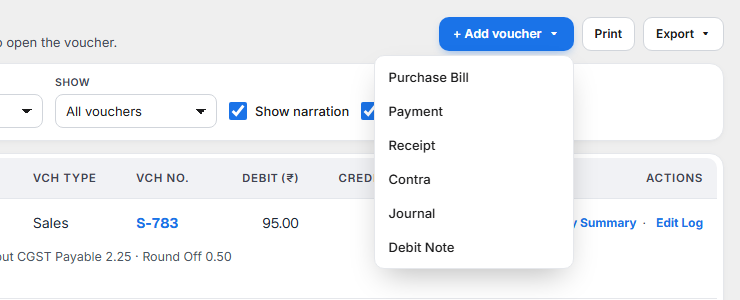
+ Add voucher opens the screen for a new Purchase Bill, Payment, Receipt, Contra, Journal or Debit Note. Print prints the list on screen. Export downloads it as Excel or PDF for your accountant.
Ledger
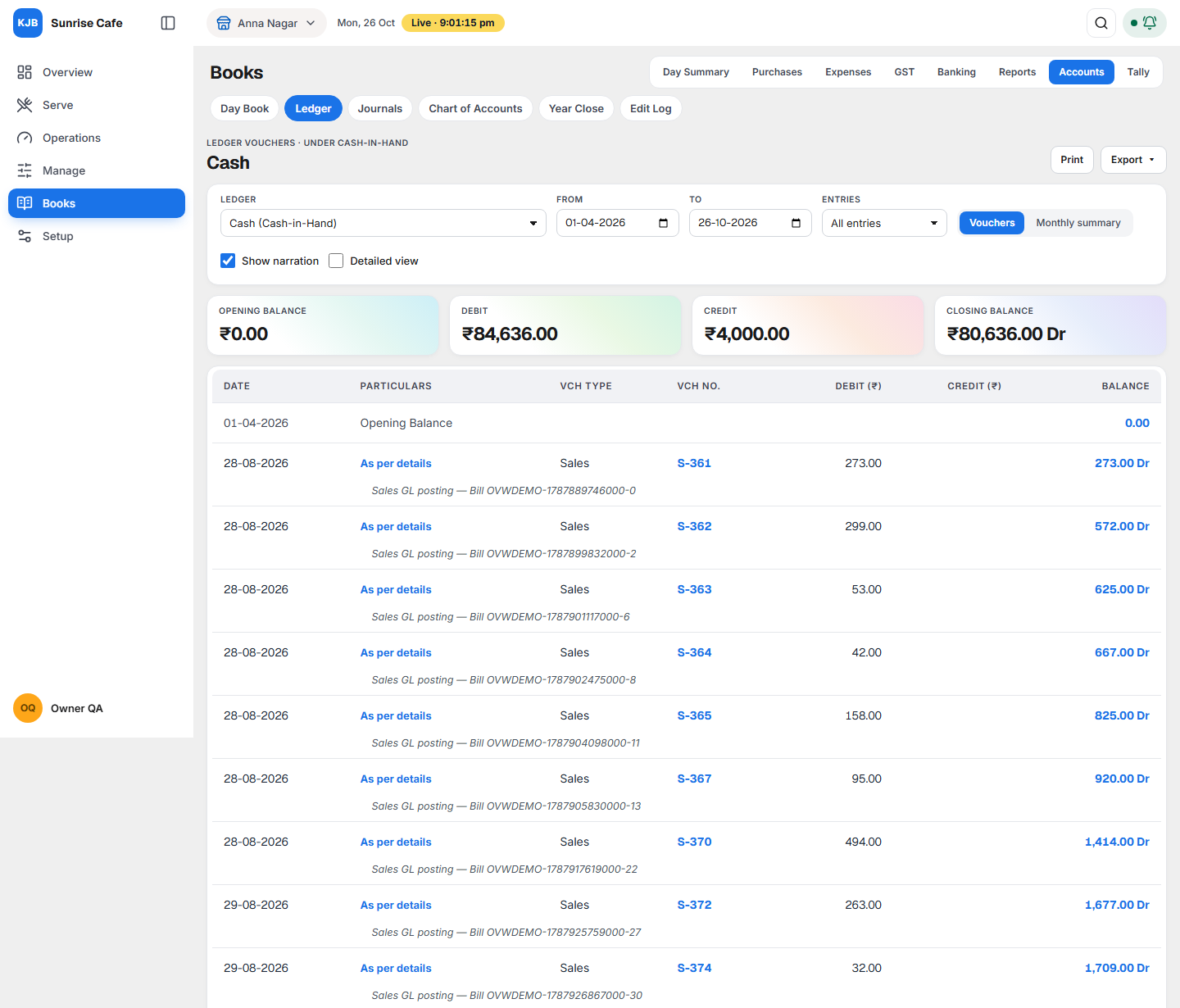
The screen is also called Ledger Vouchers. The top line shows the group the ledger sits in, for example Ledger Vouchers · under Cash-in-Hand.
Choosing what to see
| Control | What it does |
|---|---|
| Ledger | The account, shown as Name (Group). |
| From and To | The period. |
| Entries | All entries, Debit entries only, or Credit entries only. The balances stay the same. |
| Vouchers / Monthly summary | Every voucher, or one line per month with its debit, credit and closing balance. Click a month to see its vouchers. |
| Show narration and Detailed view | As in the Day Book. |
The four figures

| Card | What it means |
|---|---|
| Opening balance | The balance on the first day of the period. |
| Debit | Total of the debit lines in the period. |
| Credit | Total of the credit lines in the period. |
| Closing balance | The balance on the last day. Dr or Cr tells you which side it is on. |
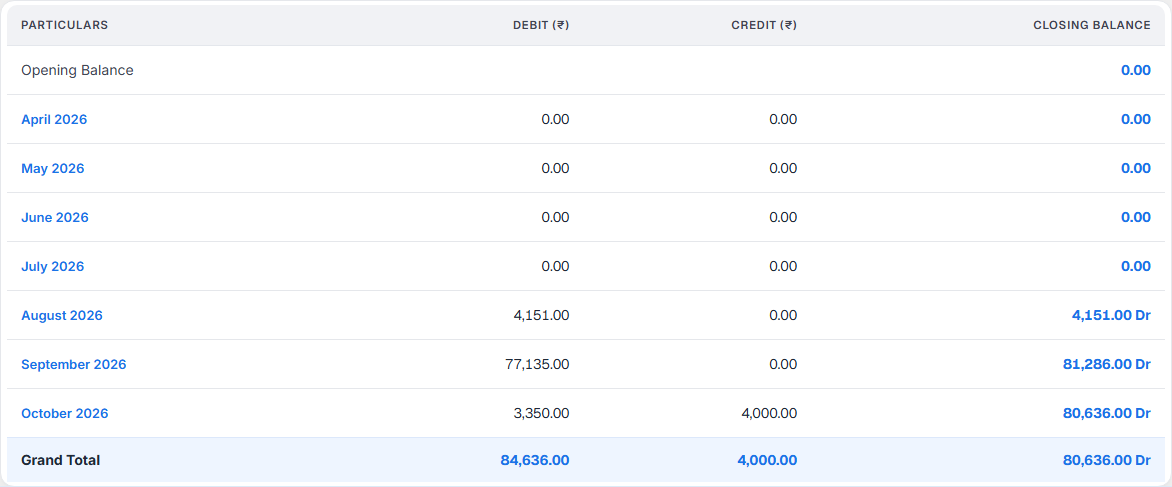
With Vouchers chosen, the table shows each voucher with the Balance after it. At the bottom, Current total and Closing Balance. When a voucher has more than one other account, Particulars reads As per details; tick Detailed view to see each account.
What Dr and Cr mean for each kind of account
| Account | Dr balance means | Cr balance means |
|---|---|---|
| Cash, bank | Money you have | Overdrawn: more paid out than came in |
| A supplier (Sundry Creditors) | You paid in advance | You owe the supplier |
| An expense (Rent, Wages) | What you spent | (rare) a refund larger than the expense |
| Sales | (rare) returns larger than sales | What you sold |
| GST payable (Output CGST, SGST) | (rare) | GST you owe the government |
| GST input (Input CGST, SGST, IGST) | GST credit you can claim | (rare) |
Supplier ledgers
For a supplier, three buttons appear at the top: + Purchase Bill, Pay and Open bills, which lists the bills not yet fully paid. Print and Export work as in the Day Book.
Journals
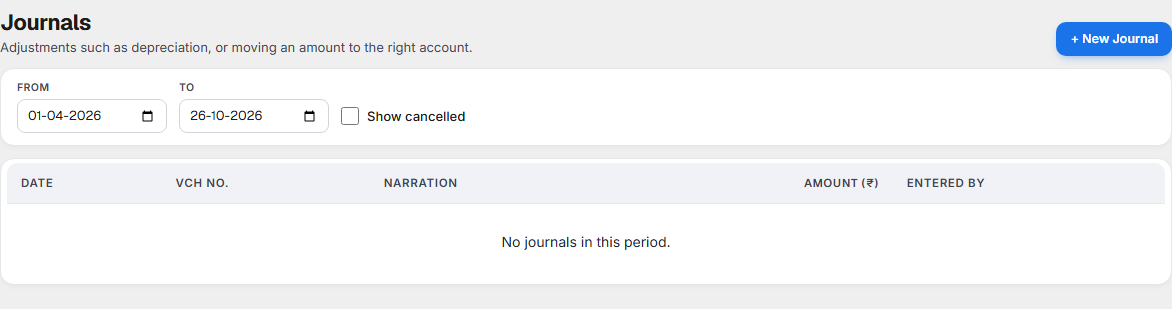
A journal is a voucher you enter by hand. Owners use it for:
- depreciation on equipment at the year end,
- moving an amount booked to the wrong account,
- the owner taking money out of the business for personal use.
Sales, purchases, payments and expenses are not entered here. They come from their own screens.
The list shows Date, Vch No., Narration, Amount and Entered by. Tick Show cancelled to see cancelled journals. Click a journal to open it.
Entering a journal
Select + New Journal. The form shows the voucher number it will take.
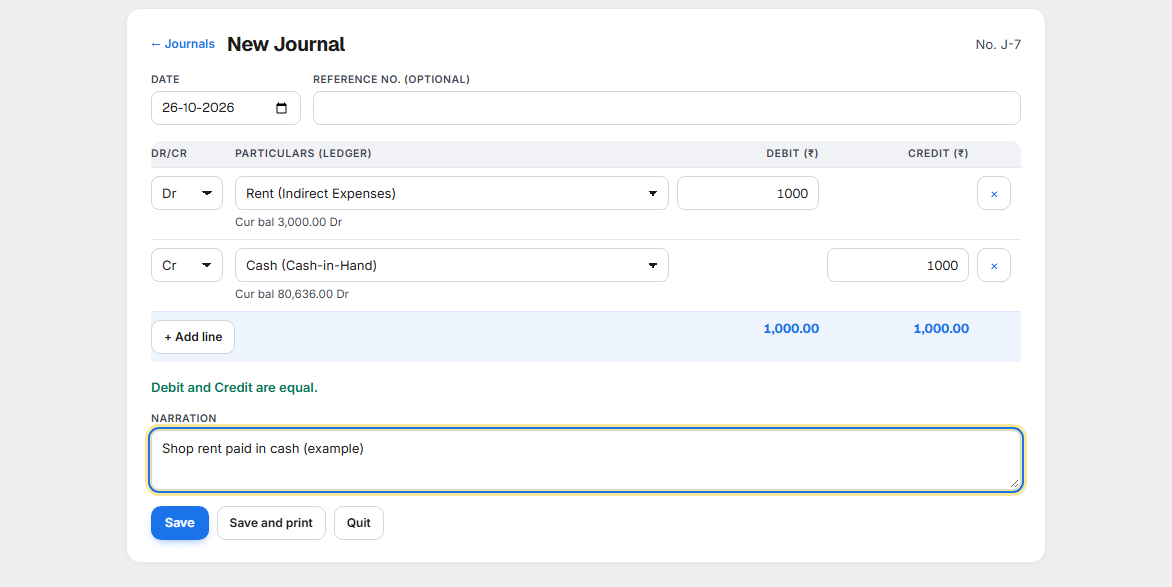
- Choose the Date. Reference no. is optional.
- On each line choose Dr or Cr, the ledger, and the amount. The ledger's current balance is shown beside it.
- Add lines with + Add line. Total debit must equal total credit; the form tells you the difference until they match.
- Write a Narration: what the entry is for. It is required.
- Select Save, or Save and print. Quit leaves without saving.
Example: depreciation. Dr Depreciation (Indirect Expenses) ₹2,500, Cr Kitchen Equipment (Fixed Assets) ₹2,500, narration Depreciation on kitchen equipment, October.
Changing a journal
Open the journal. Its panel shows the Dr and Cr lines, the narration, who entered it, and these buttons:
| Button | What happens |
|---|---|
| Alter | Opens the form to change it. The voucher keeps its number. |
| Duplicate | A new journal with the same lines, dated today. |
| Cancel voucher | The journal stays in the lists marked Cancelled, at zero. Its number is kept. |
| Delete | The journal is removed from the lists. Its number is not reused. |
| Prints the journal voucher. |
Every alter, cancel and delete is kept in the Edit Log, with who did it, when, and the old and new values. GST law requires this (CGST Rule 56(8)).
What to do when something needs attention
| You see | What it means | What to do |
|---|---|---|
| A figure in a ledger looks wrong | A voucher may be in the wrong account or entered twice. | Open the ledger, click the voucher, and correct it where it was entered. |
| Cash or a bank shows a Cr balance | More was paid out than came in, or a receipt is missing. | Check the Day Book for missing sales or receipts on those days. |
| A supplier shows Dr | You paid more than the bills entered, or a bill is missing. | Use Open bills and enter the missing bill in Purchases. |
| No Alter, Cancel or Delete on a voucher | It is dated before your No entries before this date. | Change the date in Year Close only if you really need to change an old year. |
| Save on a journal stays off | Debit and credit are not equal, a line has no ledger or amount, or the narration is empty. | Fix the line the form points to. |